What Is a CCTV NVR?
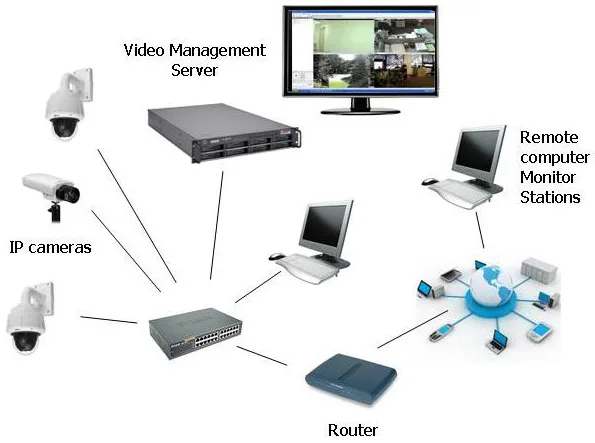
Image source: Bing (Web (fair-use with source credit))
If you're looking into setting up a modern security camera system, you've probably stumbled across the term Network Video Recorder, or NVR. Understanding what a CCTV NVR is crucial because it defines how your entire surveillance setup functions, from recording quality to remote access. It's the central hub that makes your digital security cameras work together seamlessly.
In our research, we found that NVR systems are built for IP (Internet Protocol) cameras, which communicate over a network. Manufacturer specifications confirm that these systems can typically handle resolutions up to 4K, offering significantly sharper detail than older analog setups. Let's dive into what that actually means for you.
Quick Answer
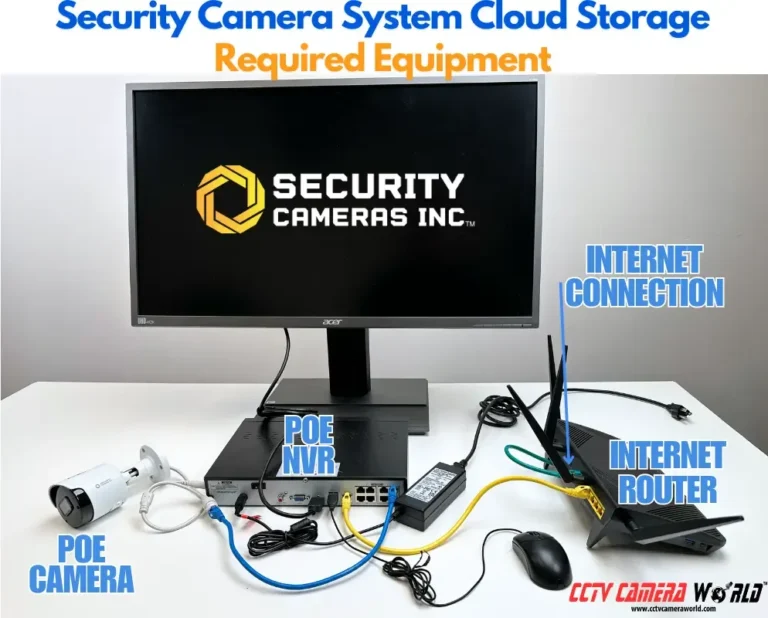
A CCTV NVR, or Network Video Recorder, is a device that records and manages video streams from IP security cameras over a network. It acts as the central hub for a digital surveillance system, storing footage, enabling live viewing, and often facilitating remote access. Unlike older DVR systems that use analog cameras, NVRs are designed exclusively for network-connected digital cameras.
NVR vs. DVR: What's the Real Difference?
The biggest decision you'll make when setting up a digital security system often boils down to NVR versus DVR. While both record video, they are fundamentally different in how they handle cameras and process signals. Understanding this distinction is key to choosing the right system for your needs.
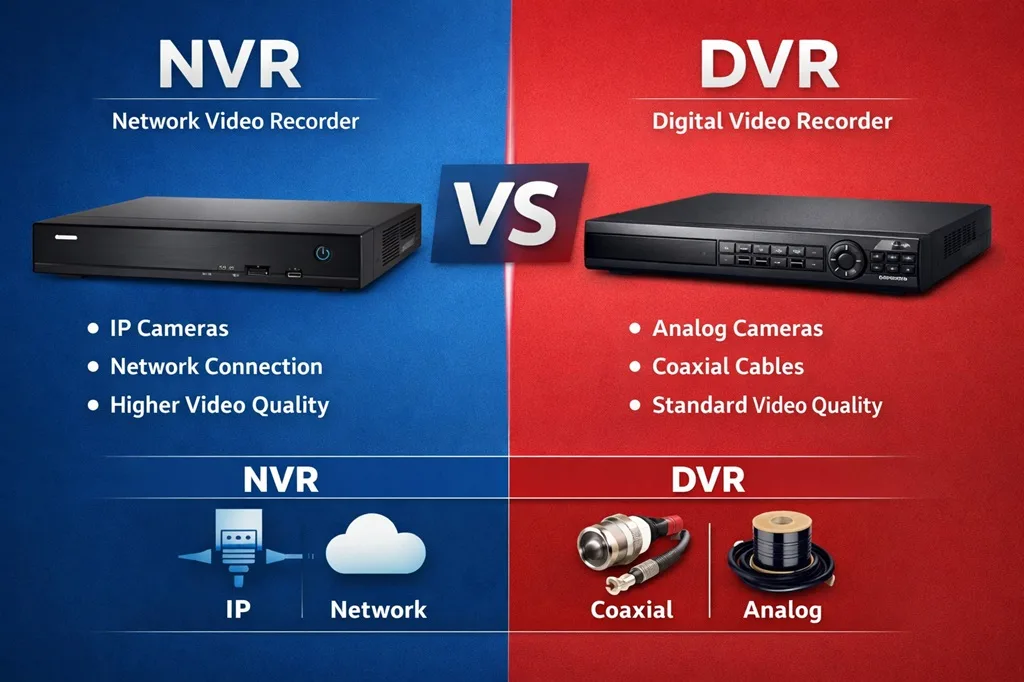
Image source: Web (Bing) / smarteyecctv.com (Web image (fair-use with source credit))
IP Cameras vs. Analog Cameras
The core difference between NVR and DVR systems lies in the type of cameras they support.
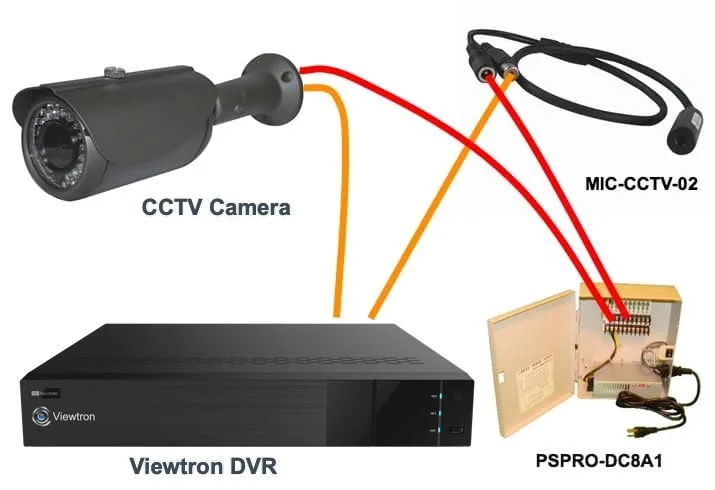
- Analog Cameras: These are the older style of security cameras. They connect to a DVR using coaxial cables, which transmit an analog video signal. The DVR then digitizes this analog signal for recording and playback.
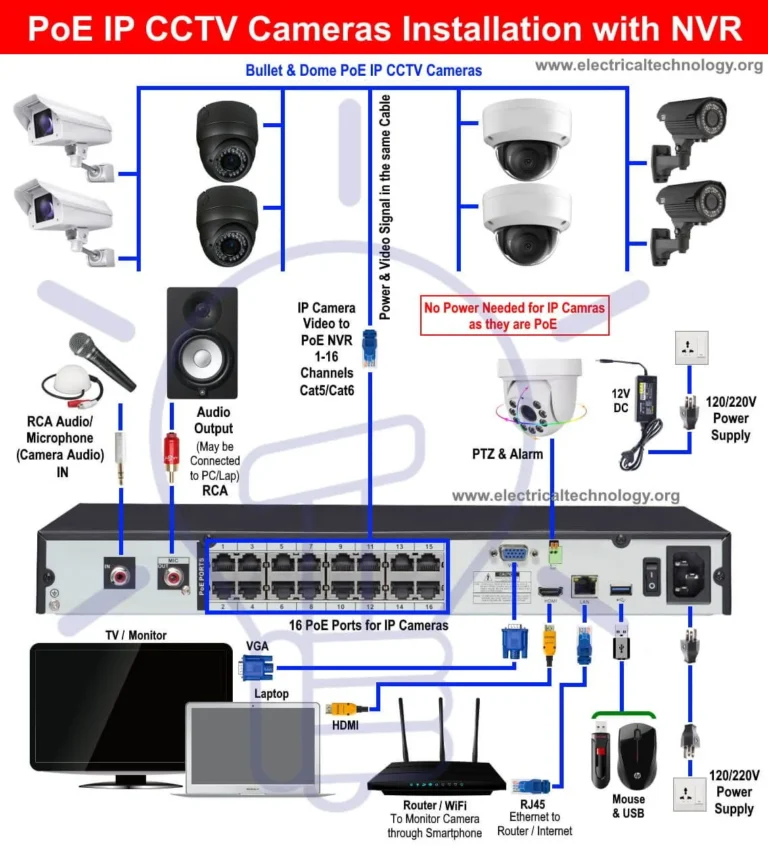
- IP Cameras: These are digital cameras that communicate over a network using standard Ethernet cables (often Cat5e or Cat6). They send digital video streams directly to the NVR. This network connectivity is what gives NVR systems their flexibility and often higher quality.
How Each Records Video
The way these systems record video also highlights their differences.
- DVR (Digital Video Recorder): With a DVR, the camera is directly wired to the DVR unit. The camera captures video, sends it as an analog signal, and the DVR itself converts it into digital data for recording.
- NVR (Network Video Recorder): Here, the IP cameras connect to your network (often via a PoE switch, which provides both power and data). The cameras process the video themselves and send digital streams over the network to the NVR. The NVR's job is then to receive, manage, and store these digital streams. This means the NVR doesn't need to digitize the signal; it's already digital. This architecture can often lead to better image quality and fewer processing bottlenecks.
How Does an NVR Work? The Core Mechanics
So, you know an NVR works with IP cameras. But how does it actually manage all that video data? Think of it as a specialized computer designed for surveillance.
Its primary job is to receive digital video streams from your IP cameras, process them, and store them efficiently.
Recording & Storage Explained
At its heart, an NVR is a sophisticated recording device. It takes the continuous or motion-triggered video feeds from each connected IP camera and saves them to internal hard drives. The amount of footage it can store depends on the NVR's capacity and the number of cameras.
For instance, an NVR with 8TB of storage connected to four 4K cameras will fill up faster than one connected to four 1080p cameras. Aggregated data from multiple manufacturer specifications show that a typical 4K IP camera can use between 5-15 Mbps, so storage needs can add up quickly if you're planning for long retention periods. You can explore resources like How Much Data Does a Security Camera Use to better estimate your needs.
Live View and Remote Access Features
Beyond just recording, NVRs offer key functionalities that make them powerful surveillance tools.
- Live View: You can connect a monitor directly to the NVR to see all your cameras simultaneously. This is great for real-time monitoring of a premises.
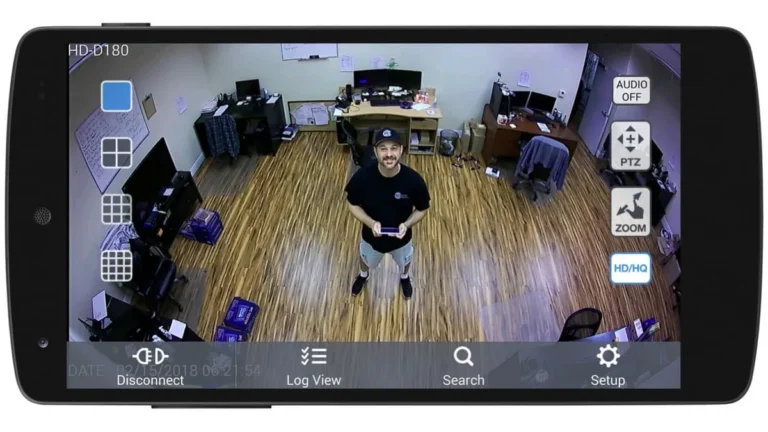
- Remote Access: Most modern NVRs are network-enabled, allowing you to access them remotely via the internet. This typically involves using a dedicated mobile app or web portal to view live feeds and recorded footage from anywhere in the world, provided your NVR and cameras have a stable internet connection. Issues with connectivity can sometimes lead to Why Is My Security Camera Delayed; checking your network setup is often the first step.
Key NVR Features to Look For
When you're shopping for an NVR, a few specifications will jump out at you. These aren't just technical jargon; they directly impact how well your surveillance system performs. Understanding these will help you pick an NVR that fits your specific security needs without overspending.
Image source: Bing (Web (fair-use with source credit))
Number of Channels & Storage Needs
The "channels" on an NVR refer to the maximum number of cameras it can support simultaneously. You'll see NVRs listed as 4-channel, 8-channel, 16-channel, and so on. It's wise to buy an NVR with more channels than you currently need if you anticipate expanding your system later.
Storage is directly tied to the number of channels and recording quality. A single 4K IP camera can generate a significant amount of data daily. As of 2026, manufacturer data indicates that a 4K camera recording continuously might require 10-15 GB per hour, meaning a few terabytes of storage can fill up quickly if you're not using smart recording settings.
You can learn more about optimizing storage by checking out What Is Continuous Recording on Security Cameras.
Resolution and Bandwidth Considerations
The resolution capability of the NVR must match or exceed that of your IP cameras. If you have 4K cameras, you need an NVR capable of recording at 4K to get the full benefit of that detail.
Bandwidth is another crucial factor. IP cameras stream a lot of data, especially at higher resolutions. Aggregate reviews report that a single high-resolution IP camera can consume 5-15 Mbps of upload and download bandwidth.
Your NVR needs to have enough internal processing power and network throughput to handle the combined bandwidth of all connected cameras. Insufficient bandwidth can lead to choppy video, lag, or Why Is My Security Camera Showing a Black Screen. Reducing the strain on your network is possible; consider resources on How to Reduce Security Camera Bandwidth.
When is an NVR System the Right Choice?
An NVR system isn't always the only option, but for many scenarios, it's the superior choice. The decision often comes down to your specific needs for clarity, scalability, and ease of management. If you're prioritizing high-quality video and a flexible setup, an NVR is likely your best bet.
Home Security Scenarios
For homeowners, an NVR system offers a robust way to monitor property. Whether you're looking to keep an eye on the front door, the backyard, or a detached garage, IP cameras managed by an NVR provide clear, detailed footage. This clarity is invaluable for identifying visitors or potential intruders.
The ability to access live feeds from your smartphone means you can check in on your home from anywhere, providing significant peace of mind. This is especially useful if you travel frequently or want to monitor deliveries.
Business Surveillance Applications
Businesses, from small retail shops to larger office complexes, benefit immensely from NVR systems. The high resolution of IP cameras means better identification of individuals, license plates, and other critical details. NVRs offer the scalability needed for larger installations, easily supporting 16 or more cameras.
Furthermore, the remote access feature allows business owners or security managers to monitor operations, track employee activity, or review incidents without needing to be physically present. This level of oversight can improve security, deter theft, and aid in investigations. For businesses concerned about data security, understanding how footage is stored locally on the NVR is a major plus.
Common Pitfalls When Choosing an NVR
Even with the advantages, choosing an NVR system isn't without its potential pitfalls. Being aware of these common mistakes can save you time, money, and a lot of frustration down the line. Forewarned is forearmed, as they say.
Compatibility Headaches
One of the most frequent issues people encounter is NVR-camera compatibility. While many NVRs support industry standards like ONVIF, not all IP cameras and NVRs play perfectly together. Some manufacturers design their NVRs to work best with their own brand of cameras, sometimes limiting the functionality or even preventing connection with third-party cameras.
Always check the NVR's compatibility list or the camera's specifications for supported NVR protocols before making a purchase. Failing to do this can leave you with a system where cameras don't connect, or certain features like two-way audio or advanced analytics don't work.
Underestimating Storage Requirements
This is a big one. People often underestimate how much data security cameras generate, especially at higher resolutions like 1080p or 4K. A common mistake is buying an NVR with insufficient hard drive space, only to find they can only store a few days of footage.
As mentioned earlier, a single 4K camera can consume a substantial amount of data daily. If you plan to keep footage for weeks or months, or if you have many cameras recording continuously, you'll need a significant amount of storage capacity. Consulting guides like How Long Should Security Footage Be Kept can help you make a more informed decision about the storage you'll need.
Frequently Asked Questions About NVRs
Can I use any IP camera with any NVR?
Generally, no. While standards like ONVIF aim for interoperability, many NVR manufacturers optimize their devices for their own camera brands. It's crucial to check the NVR's compatibility list or specifications to ensure it supports the specific IP cameras you intend to use.
Poor compatibility can lead to features not working or the camera not connecting at all.
How much storage do I really need for my NVR?
This depends on several factors: the number of cameras, their resolution (e.g., 1080p vs. 4K), your recording mode (continuous vs. motion-detection), and how long you want to keep the footage. Manufacturer data suggests a 4K camera can use between 10-15 Mbps, so planning for multiple terabytes is common for systems with several cameras and longer retention periods. You can use online calculators or consult resources like How Much Data Does a Security Camera Use to estimate your specific needs.
Do NVRs require a constant internet connection?
No, the NVR itself primarily needs a local network connection to communicate with your IP cameras and record footage. However, an internet connection is required if you want to access the NVR remotely via a mobile app or web browser to view live feeds or playback recordings from outside your local network. Without internet, remote access features won't function.
How do I update my NVR's firmware?
Firmware updates are important for security and feature enhancements. Typically, you can access the update function through the NVR's user interface, often via a connected monitor or its web interface. Some NVRs can check for and download updates automatically if connected to the internet, while others may require you to download the firmware file from the manufacturer's website and upload it manually.
It’s good practice to How to Update Security Camera Firmware regularly.
What happens if my NVR's hard drive fails?
If an NVR's hard drive fails, you will lose the ability to record new footage. Depending on the NVR model and setup, you might receive an alert about the failure. In most cases, you can replace the failed hard drive.
If you have a backup system in place, you can restore older footage. It's important to have a plan for data redundancy if critical footage retention is paramount, perhaps using solutions discussed in How to Back up Security Camera Footage.
Deciding on Your CCTV System: NVR or Something Else?
Ultimately, the choice between an NVR system and other surveillance options hinges on your specific requirements. For most modern installations prioritizing high definition, network flexibility, and remote accessibility, an NVR paired with IP cameras is the clear frontrunner. It offers a powerful, scalable, and future-proof solution for both homes and businesses.
If you're dealing with older infrastructure or have budget constraints, a DVR system might still be an option, but it comes with limitations in image quality and flexibility. The NVR's ability to integrate seamlessly into existing network infrastructure makes it a versatile choice for many users. If you're experiencing issues like video lag or black screens, understanding the underlying system, whether it's NVR-based or not, is the first step to a solution, as detailed in guides like Why Is My Security Camera Delayed or Why Is My Security Camera Showing a Black Screen.