Do CCTV Cameras Record All the Time?
The short answer is no, not always. Whether your CCTV cameras are recording constantly depends entirely on how their recording settings are configured. This flexibility is a key feature, allowing you to balance the need for comprehensive surveillance with practical considerations like storage space and power usage.
Modern security camera systems offer several recording modes. Manufacturer specifications often indicate options for continuous, motion-triggered, or scheduled recording. Understanding these modes is crucial for ensuring your system captures what you need without unnecessary data waste or missing critical events.
Image source: Bing (Web (fair-use with source credit))
Quick Answer: It Depends on Your Settings
CCTV cameras can record all the time. However, most systems are set to record only when motion is detected. This saves storage space.
You can change this setting. Continuous recording uses much more data.
How CCTV Recording Modes Work
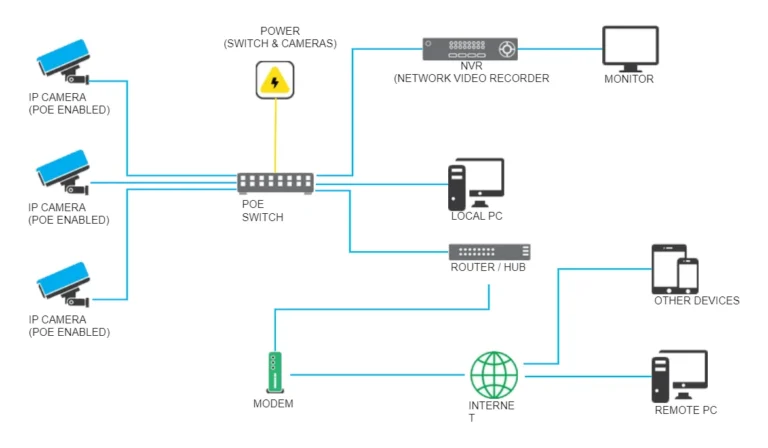
At its heart, a CCTV camera's recording function is about capturing video data and storing it, either locally on a device like a Digital Video Recorder (DVR) or Network Video Recorder (NVR), or remotely via cloud storage. The "all the time" question comes down to the recording mode your system is set to use. These modes are essentially programmed instructions that tell the camera when to actively capture and save footage.
Think of it like a light switch. You can have a light on constantly, or you can have it set to turn on only when someone enters a room. CCTV recording works on a similar principle.
The system can be told to always be "on" (recording) or to only "switch on" (start recording) when a specific event occurs, like movement. As of 2026, the technology allows for very precise control over these recording behaviors.
Continuous Recording: The All-Seeing Eye
Continuous recording is exactly what it sounds like: the camera records everything, 24 hours a day, seven days a week, without interruption. This mode is also sometimes referred to as "always-on recording" or simply "24/7 recording." When a system is set to continuous recording, it means the camera’s sensor is always active, processing and writing video data to its storage medium.
Image source: Web (Bing) / ar.inspiredpencil.com (Web image (fair-use with source credit))
This offers the highest level of surveillance coverage. There’s no risk of missing an event because it happened too quickly or didn't trigger a sensor. You’ll have a complete timeline of all activity within the camera's field of view.
This thoroughness is invaluable in situations where every moment needs to be documented, such as monitoring critical infrastructure, high-traffic areas in a business, or sensitive locations where any lapse in coverage is unacceptable.
However, this constant stream of data comes with significant drawbacks. Continuous recording demands a large amount of storage space. A single high-definition camera recording non-stop can consume hundreds of gigabytes of data per day, requiring substantial hard drive capacity in your DVR/NVR or a costly cloud storage subscription.
This is detailed in resources like how much data does a security camera use. It also means the camera and its associated recording hardware are operating at peak capacity all the time, which can potentially lead to increased wear and tear over the long term, and higher electricity bills.
Motion-Activated Recording: Smart Surveillance
Motion-activated recording is perhaps the most common and practical setting for many users. Instead of recording all the time, the camera uses its built-in sensors to detect movement within its frame. Only when it identifies motion does it begin to record video.
This is often referred to as event-based recording.
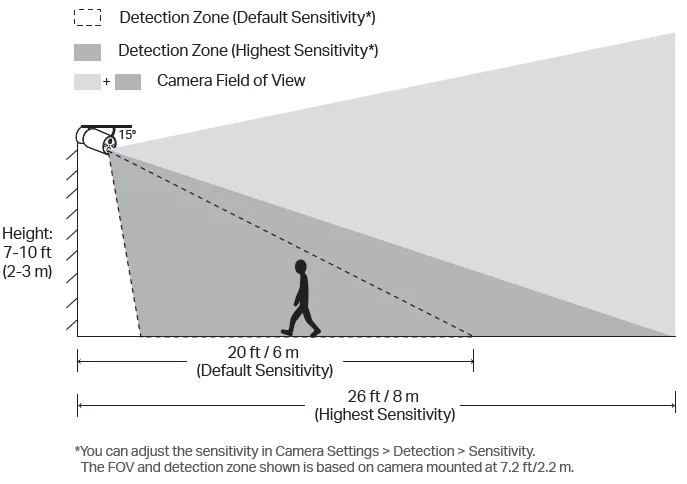
Image source: Web (Bing) / tp-link.com (Web image (fair-use with source credit))
This intelligent approach significantly conserves storage space. Instead of sifting through hours of uneventful footage, you’re presented with clips of actual events. This makes reviewing recordings much more efficient, saving you time and making it easier to find what you’re looking for.
Aggregate user reviews confirm that this method drastically reduces the amount of footage to manage, a point also covered in discussions on what is event-based recording. For home security, it means you get alerted to potential intrusions or activity without being overwhelmed by constant notifications for every passing car or falling leaf.
The primary challenge with motion-activated recording is the potential to miss events. If the motion detection is not perfectly calibrated, or if an event occurs very slowly or partially outside the camera's view, it might not trigger a recording. There can also be a slight delay, sometimes referred to as video lag, between the actual start of an event and when the recording begins, especially on less sophisticated systems.
This is a common issue that requires proper setup and troubleshooting. Understanding why is my security camera delayed can be helpful here. Despite these potential drawbacks, for most day-to-day surveillance needs, motion-activated recording offers the best balance between coverage and efficiency.
Scheduled Recording: Timing is Everything
Scheduled recording allows you to set specific times or days when your CCTV cameras should be active and recording. This mode offers a level of control that’s more specific than continuous but less reactive than motion detection. You essentially program the system to record only during the periods you designate as important.
This can be incredibly useful for businesses that have predictable operating hours. For example, a shop might only need recording during closing hours to monitor for break-ins, or an office might schedule recordings for weekends when it’s unoccupied. Similarly, a homeowner might only want recordings during work hours or when they are on vacation.
You can tailor the recording schedule precisely to your daily routines and security concerns.
The main limitation of scheduled recording is its lack of adaptability to unpredictable events. If something happens outside of your pre-set schedule, you won't have any footage. This makes it less ideal for continuous security needs compared to motion-activated or full continuous recording.
However, for very specific surveillance requirements, it can be an efficient way to manage storage and focus on particular timeframes. If you're looking to manage how your footage is stored, understanding how do security cameras store footage can provide further context.
Choosing the Right Recording Mode for You
Deciding which recording mode suits you best comes down to balancing your security needs with practical constraints like storage capacity, budget, and how you intend to review footage. There’s no single "right" answer; it’s about finding the optimal configuration for your specific situation.
If your priority is capturing absolutely everything, without exception, then continuous recording is the way to go. This is often chosen for high-security areas where even a split second of missing footage could be critical. However, you absolutely must be prepared for the storage demands. Manufacturer specifications often outline storage requirements for different resolutions and frame rates, indicating that continuous HD recording can easily fill terabytes of storage per week.
For most home users and many businesses, motion-activated recording hits the sweet spot. It provides a good balance by only saving footage when there's activity, significantly extending your recording duration on the same amount of storage. This means you can keep footage for longer periods, or use smaller, less expensive storage devices. It's also more efficient if you're concerned about electricity usage.
However, it’s vital to ensure your motion detection is properly configured to avoid missed events. If you're experiencing issues, checking why is my security camera not detecting motion can help.
Scheduled recording is more of a niche option. It's best when you have very specific, predictable times you need to monitor and are less concerned about what happens outside those windows. It’s a more manual approach to managing your recording timeline.
Ultimately, you can often mix and match these modes. Some systems allow you to set continuous recording during certain hours and switch to motion detection during others. This offers a sophisticated way to maximize both coverage and efficiency.
Exploring options like cloud vs local storage security cameras can also influence your decision based on your preferred storage method.
Common Mistakes When Setting Up Recording
When setting up your CCTV system, making a few common errors with recording modes can lead to frustration or inadequate security. Understanding these pitfalls can help you avoid them.
- Not Accounting for Storage Needs: This is probably the biggest mistake. People often opt for continuous recording without realizing just how much data it generates. A 4TB hard drive might seem large, but it can fill up in just a few days with multiple HD cameras recording 24/7. Always check the estimated data usage for your specific camera resolution and frame rate. This is why understanding how much data does a security camera use is so important.
- Overly Sensitive Motion Detection: Setting motion detection sensitivity too high can lead to constant recordings from minor environmental changes like shifting shadows, wind-blown leaves, or passing headlights. This fills up storage unnecessarily and creates a flood of alerts that users quickly learn to ignore. This is a key reason for issues like how to fix security camera motion detection.
- Motion Zones Too Broad or Too Narrow: If your motion detection zones are set too broadly, you'll get too many false alarms. If they are too narrow or cover irrelevant areas (like a swaying tree), you might miss actual events happening just outside the zone. Fine-tuning these zones is critical.
- Ignoring Firmware Updates: Outdated firmware can lead to suboptimal recording performance, bugs, or missed motion events. Always ensure your cameras and NVR/DVR are running the latest firmware. Checking how to update security camera firmware is a good practice.
- Not Testing the Settings: After configuring your recording mode, it’s essential to test it. Walk in front of the cameras, check if recordings are triggered, and review the footage to ensure it’s clear and captured as expected. Don't wait for an incident to discover your settings aren't working.