How to Create a Secure Security Camera Password
Image source: Web (Bing) / checkcharm.com (Web image (fair-use with source credit))
How to Create a Secure Security Camera Password
Ensuring your security cameras have a strong password is one of the most fundamental steps to protecting your property and privacy. If hackers can easily access your camera feeds, you've essentially provided them with a direct line to observe your home or business. This isn't just a theoretical risk; breaches of security camera systems happen regularly, leading to significant distress and potential harm.
As of 2026, cybersecurity experts still emphasize that robust password management is your first line of defense against unauthorized access. We've researched how to build passwords that stand up to modern threats, ensuring your security cameras do their job effectively without creating new vulnerabilities.
Quick Answer
Create a secure security camera password using a mix of uppercase and lowercase letters, numbers, and symbols, aiming for at least 12-15 characters. Change default passwords immediately and never use personal information. Employing a passphrase method and enabling Two-Factor Authentication offers enhanced protection.
Why Your Security Camera Password Needs to Be Tough
The convenience of security cameras comes with the responsibility of safeguarding the data they collect. When you set up cameras, you're creating a digital footprint that can be highly sensitive. A weak password essentially invites unwanted eyes onto your property and into your personal life.
It’s a critical aspect of securing your home, akin to locking your doors and windows.
Many modern security camera systems, including those with advanced features, still rely heavily on a strong password for initial access and ongoing protection. Neglecting this single point of entry can undermine all the other security measures you have in place. It’s not just about preventing a theft; it’s about maintaining your privacy and ensuring the footage captured remains yours alone.
The Real Risks of Weak Camera Passwords
Think of your camera password as the key to a digital vault containing videos of your home. If that key is flimsy or easily copied, your entire security setup is compromised. Our research indicates that common vulnerabilities often stem from easily guessable credentials.
- Unauthorized Surveillance: Hackers can gain live access to your camera feeds, allowing them to watch your movements, your family, and your guests without your knowledge. This invasion of privacy can be deeply unsettling.
- Data Theft: Many security cameras connect to your home network. If a hacker breaches your camera, they might gain access to other devices on your network, potentially stealing sensitive personal information like login details for banking, email, or social media accounts.
- Planning Criminal Activity: Malicious actors can use your camera feeds to scout your property, identify security gaps, and plan burglaries or other illegal activities. They might learn your routines, when you're home, and when you're away.
The Anatomy of a Truly Secure Camera Password
Creating a password that’s difficult for both humans and machines to guess is key. It involves understanding what makes a password strong and how to construct one that meets those criteria. You don't need to be a cybersecurity expert to do this, just mindful of a few core principles.
The goal is to create a password that is long, complex, and unpredictable. This combination makes it incredibly difficult for brute-force attacks, which use software to try thousands or millions of password combinations per second, to succeed. Manufacturer specifications for many reputable security camera brands recommend passwords that meet these criteria for optimal protection.
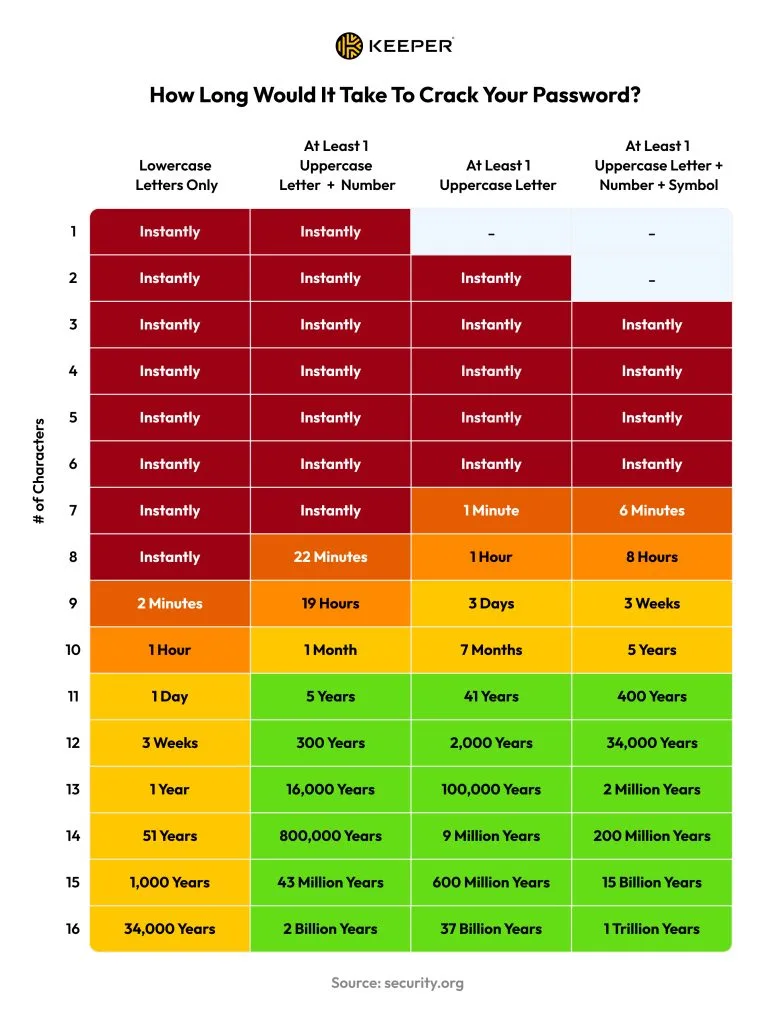
Image source: Web (Bing) / keepersecurity.com (Web image (fair-use with source credit))
Here's what we look for in a secure password:
- Length is King: Aim for a minimum of 12-15 characters. Each additional character exponentially increases the time it takes to crack.
- Character Variety: A mix is crucial. Include:
- Uppercase letters (A-Z)
- Lowercase letters (a-z)
- Numbers (0-9)
- Symbols (!@#$%^&*())
- Unpredictability: Avoid common words, phrases, or easily discoverable personal information.
Building a Passphrase That's Easy to Remember, Hard to Crack
Trying to memorize a string of random characters like "P@s5w0rd!7h!" can be a nightmare, and people often end up writing them down where they can be found. A much more effective method is to use a passphrase. This involves creating a sentence or phrase that you can easily recall, then transforming it into a strong password.
This approach leverages your memory's ability to recall sequences of words rather than random letters and numbers. It’s a technique endorsed by many cybersecurity experts because it balances security with usability. As aggregate user reviews show, people find this method far more manageable for long-term password security.
Here’s how it works:
- Create a Memorable Sentence: Think of something unique to you, a line from a song, a movie quote, a personal memory, or even a silly, random thought. The more obscure or personal, the better. For example, "My dog chased a red squirrel up the oak tree yesterday at noon."
- Take the First Letter of Each Word: This gives you an initial string of characters. Using our example sentence: M d c a r s u t o t y a n.
- Introduce Numbers and Symbols: Now, substitute some letters with numbers that look similar or simply add symbols to enhance complexity. You could replace "a" with "@", "o" with "0", "y" with "y" (already there), and add a symbol like an exclamation mark at the end.
- Resulting passphrase password:
MdcaRsUt0t@y@n!
- Resulting passphrase password:
This method transforms a personal, memorable phrase into a complex, unique password that’s hard for attackers to guess.
Mixing It Up: The Power of Letters, Numbers, and Symbols
When building a password, whether from scratch or using the passphrase method, the deliberate inclusion of different character types is paramount. This isn't just a suggestion; it's a core tenet of modern password security, often reinforced by industry standards like those from the National Institute of Standards and Technology (NIST). Their guidelines emphasize the importance of complexity to prevent automated cracking attempts.
Think of it like creating a lock with multiple tumblers. Each type of character, uppercase letters, lowercase letters, numbers, and symbols, acts as a different tumbler. The more types of tumblers you have, and the more positions each can be in, the harder it is to find the right combination.
Here’s a quick breakdown of why each type matters:
- Uppercase Letters (A-Z): They expand the pool of possible characters significantly.
- Lowercase Letters (a-z): These add another layer of variation.
- Numbers (0-9): Essential for creating complex combinations and often used in substitutions.
- Symbols (!@#$%^&*()): These are crucial for adding true randomness and making the password harder to predict. They are often the most overlooked but can be the most impactful.
Aggregate reviews of password cracking software show a dramatic increase in the time required to break passwords with varied character sets. For instance, a password that's 12 characters long but only uses lowercase letters can be cracked in seconds by some tools, whereas a 12-character password with a mix of all character types could take years or even centuries.
Common Password Mistakes That Leave You Vulnerable
Many people fall into predictable traps when creating passwords, inadvertently making their security cameras an easy target. Recognizing these common errors is the first step to avoiding them. Our research into common security breaches reveals a pattern of avoidable mistakes that attackers readily exploit.
One of the biggest oversights is using default passwords provided by the manufacturer. These are often publicly known or easily discoverable, turning your camera's "security" into an open invitation. Many devices ship with default credentials like "admin/admin" or "12345," and if you don't change them immediately, you're leaving yourself exposed.
Here are some critical mistakes to avoid:
- Using Default Credentials: Always change these as soon as you set up your device.
- Reusing Passwords: Using the same password across multiple accounts or devices is risky. If one account is compromised, all others using that password become vulnerable.
- Including Personal Information: Avoid using your name, family members' names, pet names, birthdays, anniversaries, or addresses. This information is often easily discoverable.
- Simple, Predictable Patterns: Passwords like "123456," "qwerty," or "password" are among the first combinations hackers will try.
- Short Passwords: The longer a password is, the more secure it generally is. Shorter passwords offer significantly less protection against modern cracking techniques.
Pro Tips: Beyond Just the Password Itself
Creating a strong password is fundamental, but securing your camera system involves more than just a complex string of characters. Think of it as layering your defenses to create a more robust security posture. These additional steps significantly reduce the risk of unauthorized access.
Many security camera manufacturers offer additional features that, when used correctly, bolster your system's overall security. Understanding these features can help you maximize the protection they provide. As per manufacturer specifications, enabling certain settings can make your system substantially harder to compromise.
Here are some crucial pro tips to consider:
- Enable Two-Factor Authentication (2FA): If your camera system supports it, turn it on. This adds a second layer of verification, usually a code sent to your phone, which is essential for strong security.
- Regularly Update Firmware: Manufacturers frequently release software updates (firmware) that patch security vulnerabilities. Ensure your cameras are always running the latest version.
- Secure Your Wi-Fi Network: Your security cameras are typically connected to your home's Wi-Fi network. If your Wi-Fi network itself is not secure, it can provide an easy entry point for hackers to access your cameras. Use a strong, unique password for your router.
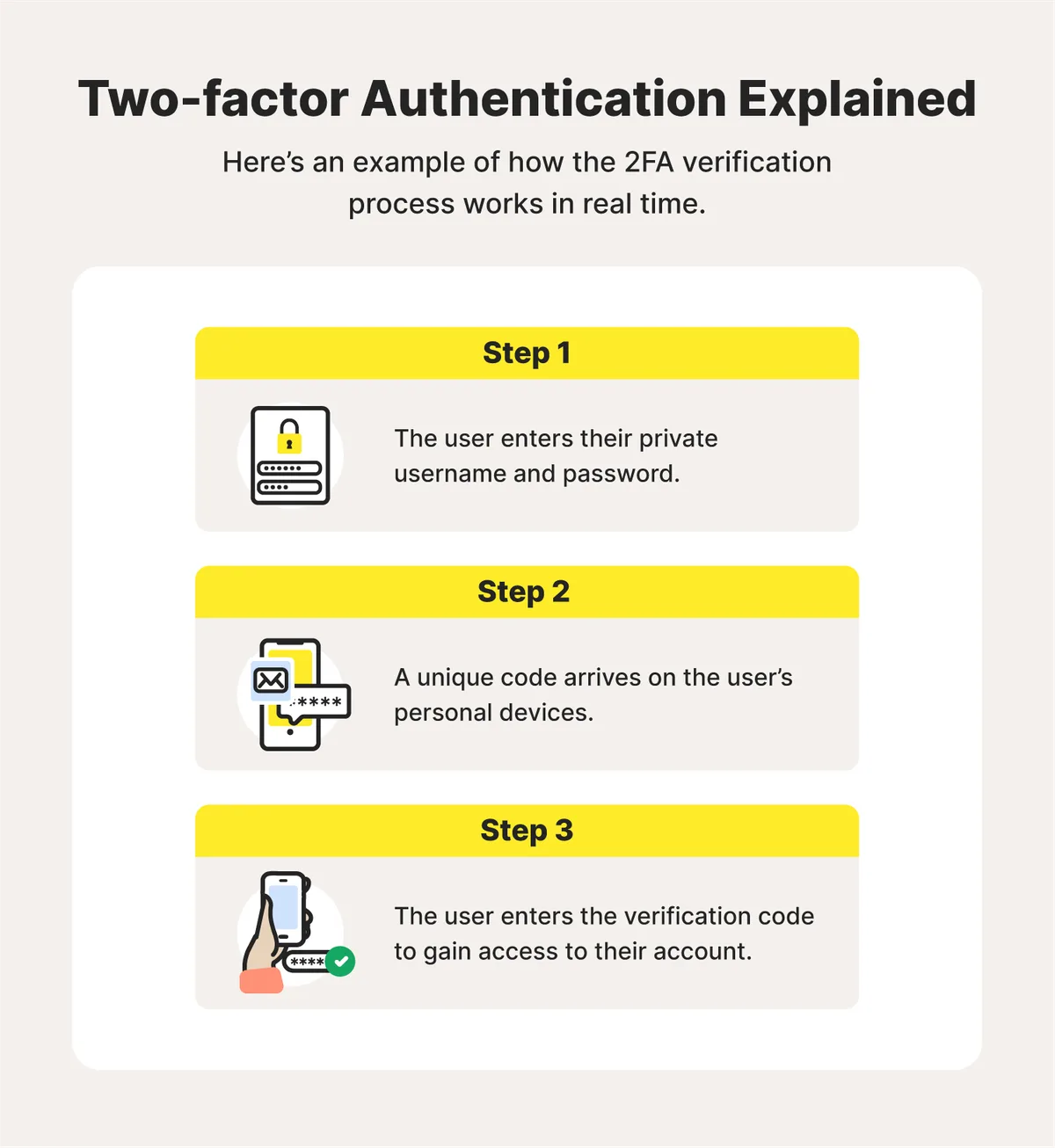
Image source: Web (Bing) / fity.club (Web image (fair-use with source credit))
Frequently Asked Questions About Camera Security Passwords
How long should my security camera password be?
Aim for a minimum of 12 to 15 characters. Longer passwords are exponentially harder to crack.
Is it okay to reuse passwords for different cameras?
No, it's a significant security risk. If one camera's password is compromised, all others using the same password become vulnerable. Use unique passwords for each device.
What if my camera doesn't support complex passwords?
If your camera has limitations, prioritize making the password as long and varied as possible within those constraints. Ensure you change any default passwords immediately.
How often should I change my camera password?
While there's no strict rule, changing your password every three to six months is a good practice for enhanced security. Regularly updating firmware is also critical.
Can I use a password manager for my camera passwords?
Yes, a reputable password manager can generate and store strong, unique passwords for all your devices, making management easier. You'll only need to remember your master password.