What Does a Home Security System Include
Ever wonder what exactly makes up a home security system, or what all those parts are for? It's not just a random collection of gadgets; each piece plays a specific role in protecting your home and loved ones. Understanding these components is the first step to feeling secure.
These systems typically involve a central hub, sensors to detect intrusions, and ways to alert you or authorities. For instance, many modern systems leverage wireless communication protocols, often adhering to standards that ensure signal integrity and security, like those outlined by the Z-Wave Alliance for smart home devices.
Quick Answer
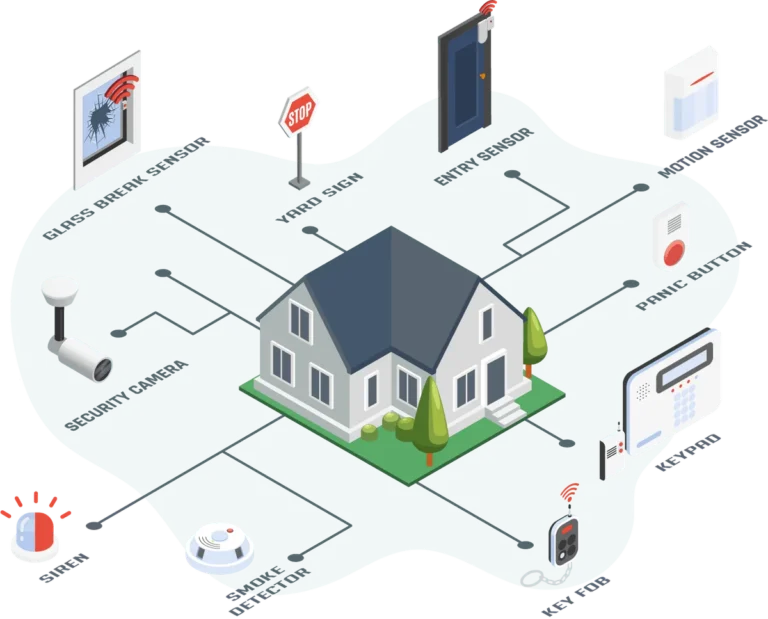
A home security system includes a control panel, door/window sensors, motion detectors, and often cameras. It also features a siren for alerts and communicates via cellular, Wi-Fi, or landline. Optional additions include environmental sensors and smart home integrations.
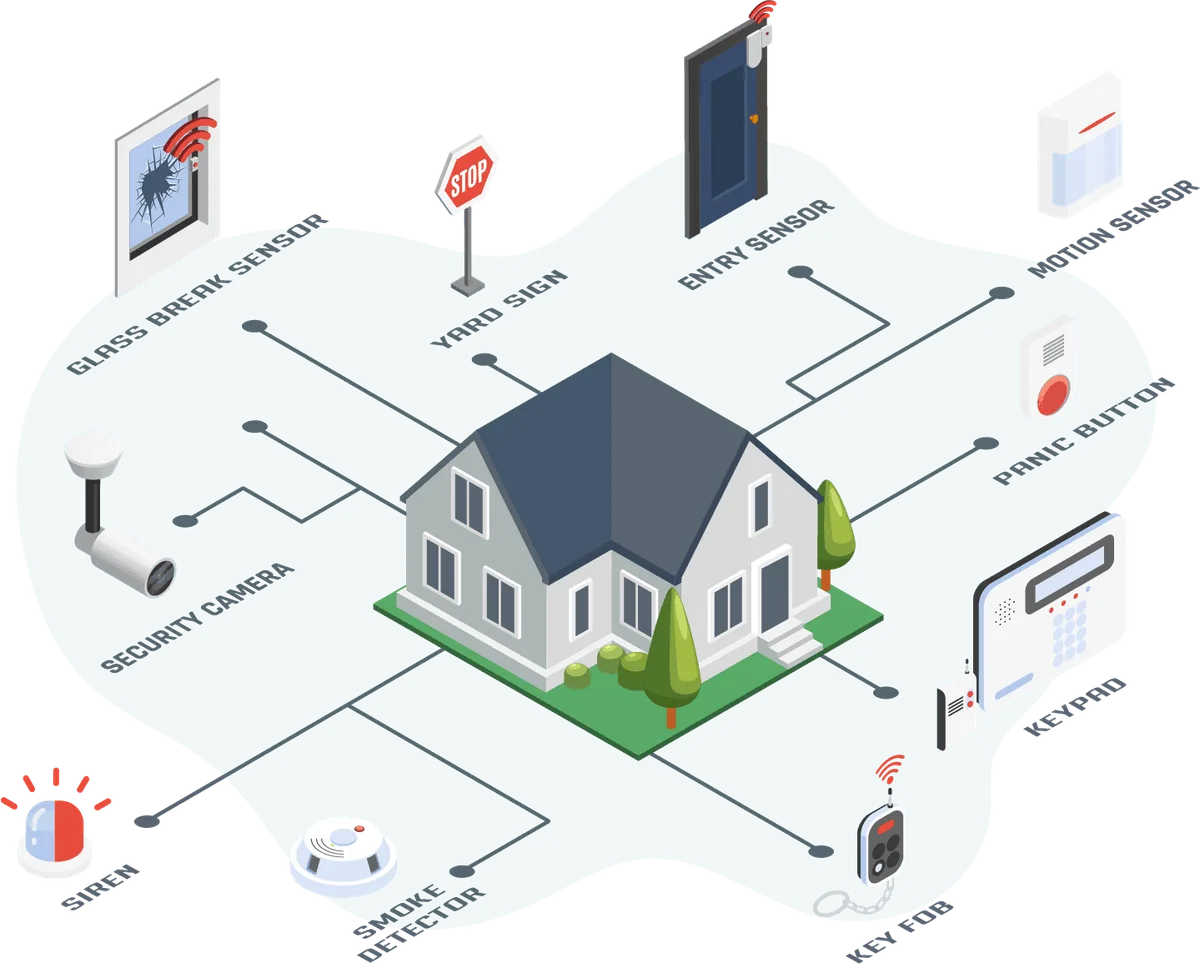
Image source: Web (Bing) / security.org (Web image (fair-use with source credit))
The Brains of the Operation: The Control Panel
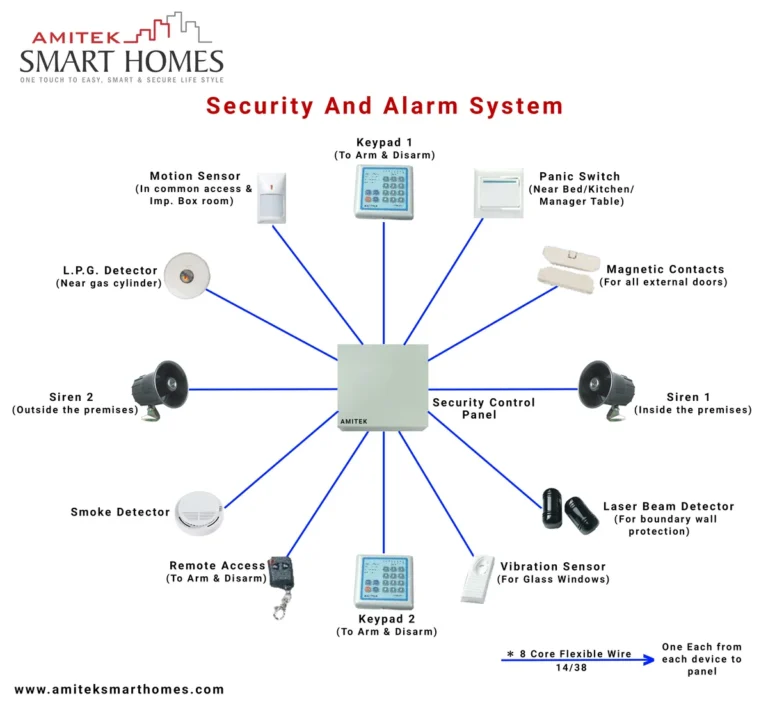
This is where it all begins and ends. The control panel, sometimes called the hub or base station, is the central command center for your entire security setup. Think of it as the brain that receives information from all your sensors and decides what to do with it.
What It Does
The control panel's main job is to manage the system's functions. It communicates with all the connected devices, like your door sensors and cameras. When a sensor is triggered, it receives that signal and then processes it.
Based on whether the system is armed or disarmed, and how it's programmed, the control panel will then activate the alarm siren, send alerts to your smartphone, or notify a professional monitoring service. It’s the central point for arming and disarming, usually via a keypad or a mobile app.
What It Looks Like
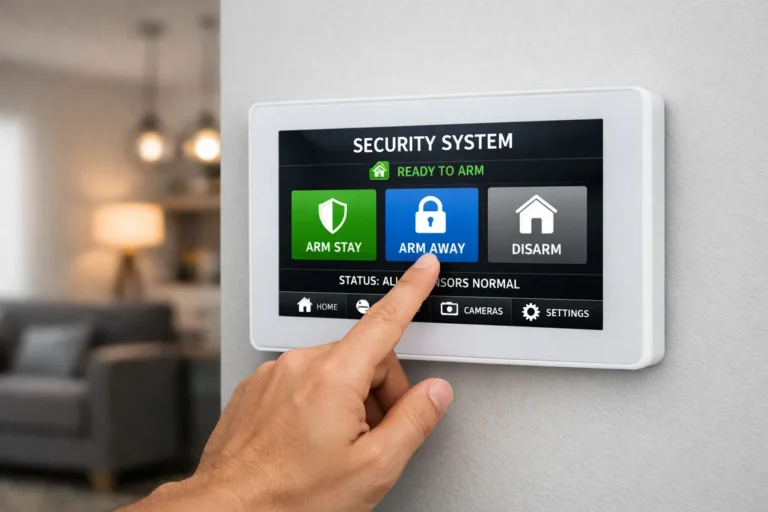
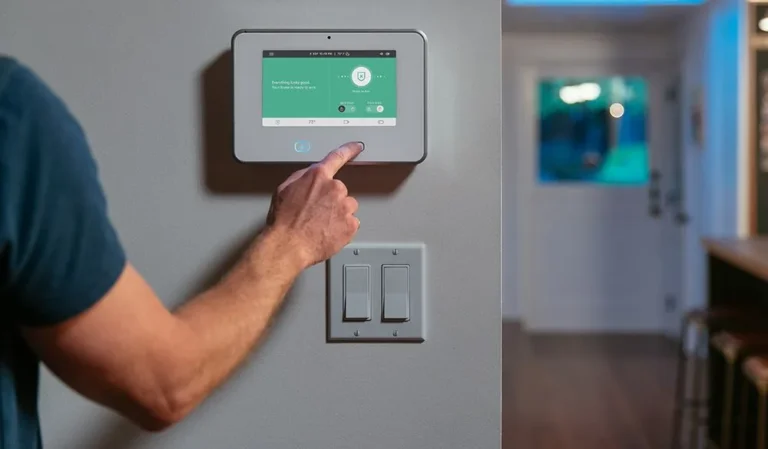
You'll most commonly see control panels as a dedicated keypad mounted on a wall near an entry point, like your front door or garage. These keypads often have physical buttons for arming, disarming, and accessing system menus.
Alternatively, more advanced systems might feature a touch screen interface, offering a more modern and intuitive user experience. Some even integrate the control panel into a sleek, standalone unit that blends into your home decor.
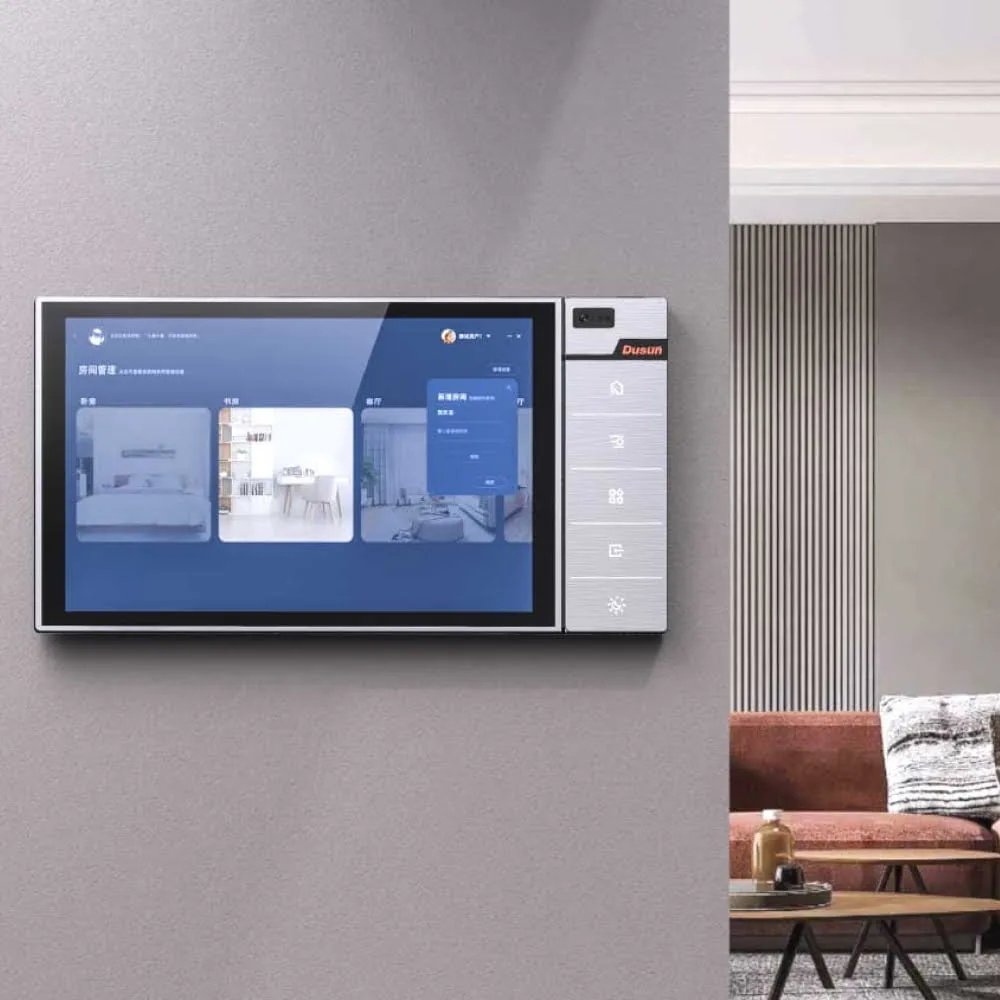
Image source: Web (Bing) / dusuniot.com (Web image (fair-use with source credit))
The Eyes and Ears: Sensors and Detectors
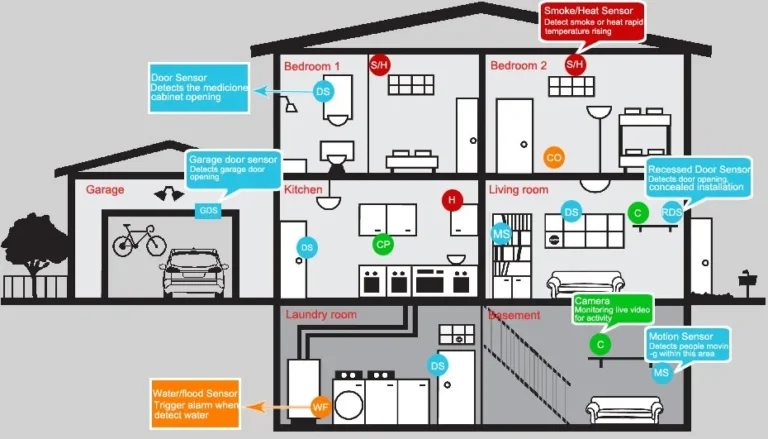
These are the components that actively watch and listen for anything out of the ordinary. They’re strategically placed around your home to cover critical entry points and vulnerable areas.
Door and Window Sensors
These are perhaps the most fundamental security devices. They are typically small, two-part devices. One piece attaches to the door or window itself, and the other attaches to the frame.
When the door or window is closed, the two parts are close together, completing a circuit. As soon as the door or window is opened, the connection is broken, and the sensor immediately sends a signal to the control panel. This is a key way to know if someone has breached an entry point.
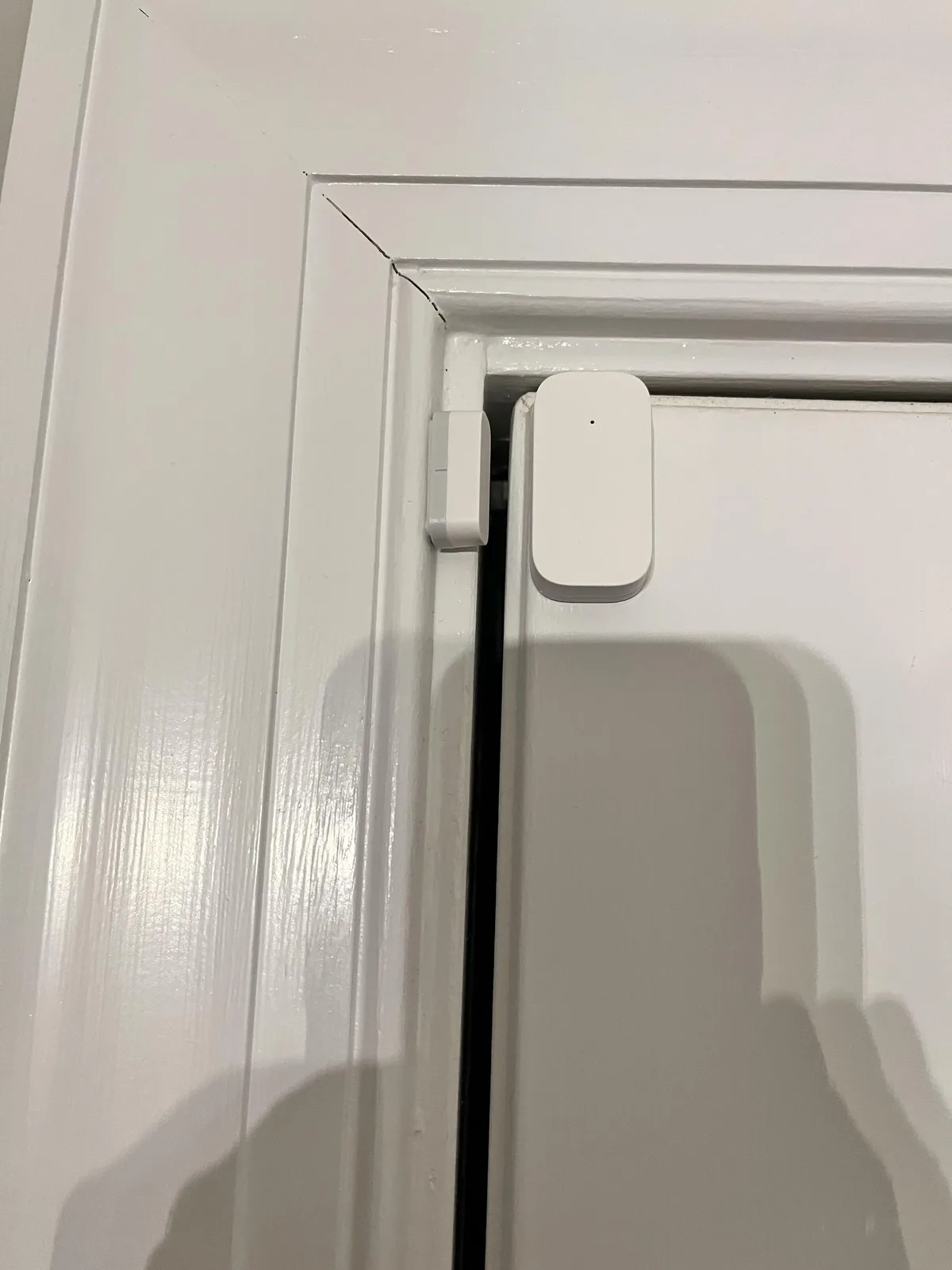
Image source: Web (Bing) / reddit.com (Web image (fair-use with source credit))
Motion Detectors
Motion detectors are excellent for covering larger interior spaces, such as living rooms, hallways, or open-plan areas. They use various technologies to sense movement. Passive infrared (PIR) sensors are common, detecting heat signatures.
Many motion detectors offer adjustable sensitivity settings. This is crucial for preventing false alarms, especially if you have pets. You can often set them to ignore smaller animals while still detecting human intruders.
Glass Break Detectors
These specialized sensors are designed to detect the specific sound frequency or shockwave associated with breaking glass. They provide an additional layer of security, particularly for homes with large windows or glass doors, offering protection even if a window is smashed without being opened.
Capturing the Evidence: Cameras
Cameras have become a staple in home security, offering not just detection but also visual verification of events. They provide a crucial "eyes on" capability, whether you're home or away.
Indoor vs. Outdoor Cameras
Indoor cameras are generally used to monitor specific areas within the home, such as a nursery, a pet's favorite spot, or a main living area. They are less exposed to the elements and can offer a clear view of internal activities.
Outdoor cameras, on the other hand, are built to withstand weather conditions like rain, heat, and cold. They are positioned to monitor entry points, driveways, or yards, acting as a visual deterrent and capturing evidence of any suspicious activity outside your home. Many feature robust night vision capabilities.
Doorbell Cameras
Doorbell cameras are a popular hybrid device that combines a traditional doorbell with a built-in camera, microphone, and speaker. This allows you to see, hear, and speak to anyone who approaches your front door, all from your smartphone or tablet. They offer convenience by letting you screen visitors, and enhanced security by recording activity at your main entry point.
The Alarm: Letting Everyone Know
When a sensor detects an intrusion or other triggered event, the system needs to alert you and potentially others. The primary component for this is the alarm siren.
The siren's purpose is twofold: to immediately notify occupants within the home that something is wrong, and to startle and deter any potential intruders. These sirens can range in volume, with professional systems often featuring very loud alarms designed to be heard over a significant distance, potentially alerting neighbors and discouraging further intrusion.
Connecting to the Outside World: Communication Methods
For a home security system to be truly effective, it needs a reliable way to communicate alerts. This communication is what connects your home’s sensors to you and, if applicable, to a professional monitoring service.
- Landline: Older systems often relied on a traditional phone line. While simple, this method can be vulnerable, as intruders might cut the phone line to disable the alarm.
- Cellular: Modern systems frequently use cellular communication. This is generally more reliable than landlines because it uses a separate network, making it harder to disable. It's a common choice for systems that include professional monitoring.
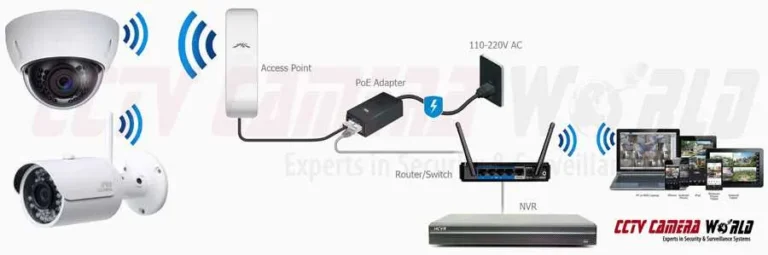
- Internet/Wi-Fi: Many smart home security systems connect directly to your home's internet. This allows for rapid communication of alerts to your smartphone via an app and enables features like live video streaming from cameras. However, it can be affected by your home internet service being down.
Optional Add-Ons for Extra Peace of Mind
Beyond the core components like sensors and cameras, modern home security systems offer a range of optional add-ons. These can significantly expand your system's capabilities, offering broader protection and greater convenience tailored to your specific needs and lifestyle.
- Environmental Sensors: These devices go beyond intrusion detection to monitor for household hazards. Smoke detectors can alert you to fires, carbon monoxide detectors warn of dangerous gas leaks, and water leak sensors can notify you of potential flooding from burst pipes or appliance failures.
- Smart Home Integration: Many security systems can now integrate with other smart home devices. This allows for automated actions, such as lights turning on when motion is detected, smart locks engaging when the system is armed, or thermostats adjusting for energy savings. This interconnectedness creates a more automated and responsive home environment.
- Key Fobs and Panic Buttons: For quick and easy system control, key fobs can arm or disarm the system with a simple button press, handy when you're rushing in or out. Panic buttons, either standalone or integrated into key fobs, can be discreetly pressed to immediately trigger an alarm and alert monitoring services in an emergency.
How It All Works Together
Understanding how the individual pieces of a home security system interact is key to appreciating its effectiveness. It’s a coordinated effort, where each component relies on the others to provide comprehensive protection.
When the system is armed, the control panel actively monitors signals from all connected sensors. For instance, if a door sensor detects that a door has been opened, it immediately sends a signal to the control panel. The control panel then processes this information.
If the system is armed, the control panel will trigger the alarm siren. Simultaneously, if you have a professional monitoring service, the control panel will transmit an alert to the monitoring center. For Wi-Fi or cellular-connected systems, an alert will also be sent directly to your smartphone via a dedicated app, often with live video feeds from any relevant cameras.
This rapid, multi-pronged response is what makes a security system an effective deterrent and early warning system.
Benefits & Drawbacks: Weighing Your Options
Choosing a security system means looking at both the good and the not-so-good. Understanding these points can help you decide if a system is the right investment for your home and if specific features are worth the trade-offs.
Advantages
- Enhanced Security: The primary benefit is increased protection against break-ins and unauthorized access. Visible cameras and signage can also deter potential criminals.
- Peace of Mind: Knowing your home is monitored can significantly reduce anxiety, whether you're at home, at work, or on vacation.
- Remote Monitoring: Modern systems allow you to check on your home via smartphone apps, view live camera feeds, and receive alerts no matter where you are.
- Potential Insurance Discounts: Many insurance providers offer reduced premiums for homes equipped with a monitored security system.
Drawbacks
- Cost: Systems can involve upfront purchase costs for equipment, plus potential monthly fees for monitoring services or advanced features. As of 2026, professional monitoring services typically range from $20 to $60 per month.
- False Alarms: Improper installation, sensor sensitivity issues, or user error can lead to false alarms, which can be inconvenient and may incur fines in some municipalities.
- Technical Issues: Like any electronic system, security components can malfunction, require maintenance, or be affected by power outages or internet connectivity problems.
- Privacy Concerns: Cameras, especially indoor ones, raise privacy questions. It's vital to understand where cameras are placed and how footage is stored and accessed.
Mistakes to Avoid: Common Pitfalls
When setting up and using a home security system, a few common missteps can undermine its effectiveness. Being aware of these can help you avoid them and ensure your system works as intended.
- Poor Sensor Placement: Placing motion detectors in areas with direct sunlight, near heating vents, or where pets frequently roam without proper adjustment can lead to false alarms. Door and window sensors must be aligned correctly to ensure they register openings.
- Neglecting Maintenance: Sensors need fresh batteries, cameras need lens cleaning, and software may need updates. Failing to perform routine checks means a component could fail when you need it most.
- Weak Passwords and Network Security: If your system connects to Wi-Fi, using weak passwords or not securing your home network makes it vulnerable to hacking. This could compromise your system's integrity or expose your data.
- Over-Reliance on One Component: Assuming a single camera or motion detector will cover everything is a mistake. A layered approach, using multiple types of sensors and devices, provides more robust protection.
Comparing DIY vs. Professional Installation
When you decide to get a home security system, one of the first big choices you'll face is whether to install it yourself or have a professional do it. Both routes have their pros and cons, and the best choice really depends on your comfort level with technology, your budget, and the complexity of the system you want.
DIY (Do-It-Yourself) Systems
These systems are designed for easy setup by the homeowner. They typically use wireless components that connect to a central hub via Wi-Fi or cellular signals.
- Pros: Generally lower upfront cost, greater flexibility in choosing components and brands, and no installation fees. You can often expand the system yourself later.
- Cons: Requires a certain level of technical comfort. If something goes wrong, you're on your own for troubleshooting. Placement of sensors and equipment needs careful consideration to avoid performance issues.
Professional Installation
With this option, a trained technician installs and configures the entire system for you. They'll assess your home's layout and recommend optimal placement for all devices.
- Pros: Ensures correct installation and optimal performance. Technicians can often hardwire components for greater reliability and may offer ongoing support. This is ideal if you want a complex system or are less tech-savvy.
- Cons: Higher upfront cost due to labor fees. You might be tied to a specific provider or brand. Scheduling installation can sometimes take time.
What If a Component Fails?
Even the best security systems can experience occasional glitches or component failures. Knowing what to do when a part stops working is crucial for maintaining your home's security.
- Identify the Faulty Component: Your control panel should typically indicate which sensor or device is offline or malfunctioning. This might appear as an error message or a specific icon on the keypad.
- Check Power and Connectivity: For wireless devices, ensure batteries are fresh. If it's a wired device or camera connected to Wi-Fi, check its power source and your home's internet connection. Sometimes, simply rebooting the router or the control panel can resolve temporary communication issues.
- Consult the Manual: The system's user manual is your best friend. It usually has a troubleshooting section that walks you through common problems and solutions for specific components.
- Contact Support: If you can't resolve the issue yourself, reach out to the manufacturer's customer support or your monitoring service provider. They can offer further guidance or arrange for a replacement part or service call.
Frequently Asked Questions
What's the most important part of a home security system?
The control panel is the central hub. It receives signals from sensors, triggers alarms, and communicates with monitoring services or your smartphone.
Do I really need motion detectors if I have door sensors?
Motion detectors cover interior spaces that door sensors can't. They're essential for detecting intruders who might bypass doors and windows, offering a broader safety net.
Can I connect a security system to my existing smart home devices?
Yes, many modern systems offer smart home integration. This lets them work with lights, locks, and thermostats for automated actions and enhanced convenience.
How do I know if my security system is working?
Regular testing is key. Most systems have a self-test feature, and professional monitoring services can also perform remote checks to ensure all components are communicating correctly.
Is a security system difficult to install?
Installation can range from simple DIY setups for wireless systems to more complex wired installations requiring professional help. Always follow manufacturer instructions carefully.