How to Prevent False Alarms
Dealing with a shrieking alarm when there’s no actual threat is incredibly annoying. Fortunately, figuring out how to prevent false alarms often comes down to understanding a few common triggers and making simple adjustments. Most systems are designed for reliability, but sometimes the environment or everyday use can throw them off.
Manufacturer specifications indicate that properly installed and maintained systems should have an annual false alarm rate below 0.5%. When yours goes off unexpectedly, it’s usually a sign something needs a closer look, not a complete system overhaul. We'll walk through the most likely culprits and how to fix them, helping you regain peace of mind.
Quick Answer
Prevent false alarms by identifying specific triggers like pet movement, drafts, or low batteries. Regularly check and clean sensors, ensure proper installation, and train household members on correct system operation. Address environmental factors and update sensor batteries proactively for a reliable system.
Why False Alarms Ruin Your Peace (and What to Do)
Imagine this: you’re settled in for the night, or maybe you’re just out for a quick errand, when suddenly, your alarm system unleashes its full fury. The piercing sound is unsettling, and the thought of actual danger flashes through your mind. But then you check, and there’s no intruder, no fire, nothing wrong at all.
That’s a false alarm, and it's incredibly disruptive. It can be embarrassing if authorities arrive, and in some areas, it can even lead to fines.
Understanding why these alarms happen is the first step to stopping them. They aren’t random events; they’re usually caused by specific, identifiable issues. Our research shows that a vast majority of false alarms stem from environmental factors, simple user errors, or minor system maintenance needs rather than a fundamental flaw in the alarm technology itself.
By becoming a bit of a detective, you can often resolve these issues yourself.
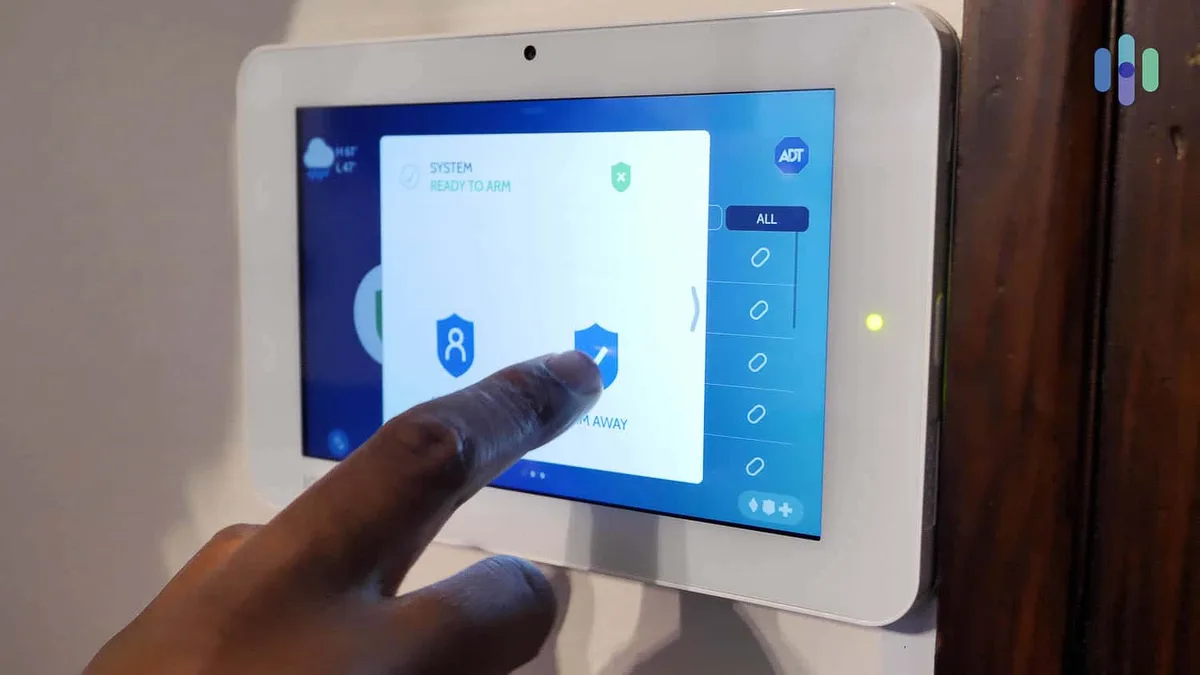
Your False Alarm Detective: A Step-by-Step Workflow
When your alarm system starts acting up, don't panic. Think of it like a puzzle. We need to pinpoint the cause before we can find the solution.
This workflow will help you systematically identify and address common false alarm triggers.
Is it a Specific Sensor Problem?
Many modern alarm systems can tell you exactly which sensor was triggered. If yours does this, it’s a huge clue. The location and type of sensor are key to figuring out what might be setting it off.
Troubleshooting Window and Door Sensors
Window and door sensors are typically magnetic contact sensors. They work by having two parts: one attached to the frame, and one to the movable part (like the window or door itself). When the two parts are separated by more than a small gap (usually less than an inch), the sensor signals an alert.
- If a window/door sensor is triggering:
- Check for loose mounting: Is the sensor securely attached to both the frame and the window/door? Vibrations or even slight shifts can cause them to misalign.
- Verify alignment: Ensure the two parts of the sensor are close enough when the window or door is closed. If they're too far apart, the system might think it's open.
- Inspect for obstructions: Is anything pressing against the window or door that might cause it to shift slightly when closed?

Troubleshooting Motion Detectors
Motion detectors, often called Passive Infrared (PIR) sensors, detect changes in heat. They are designed to spot movement by sensing the infrared energy radiated by a warm body. False alarms can occur if something other than a person or pet is causing a heat change or movement within the sensor's field of view.
- If a motion detector is triggering:
- Consider the direction: Is it pointed towards a heating vent, direct sunlight, or a heat-generating appliance? These can cause false triggers.
- Check for obstructions: Is anything in the room that might move slightly, like curtains blowing near a vent, or lightweight objects that could be nudged by a draft?
- Look for insects: Spiders or other bugs building webs in front of the sensor can sometimes interfere with its detection capabilities.
Is it an Environmental Trigger?
Environmental factors are incredibly common causes of false alarms, especially with motion sensors. Your alarm system is designed to detect specific changes, and sometimes the natural world mimics those changes.
Dealing with Pets and Motion Sensors
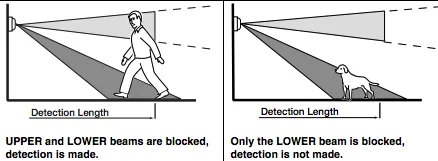
Pets are probably one of the most frequent causes of false alarms for motion detectors. Even if your pet isn't directly touching the sensor, their movement and body heat can be enough to trigger it, especially if the sensor isn't specifically designed to ignore them.
- If pets are the likely cause:
- Relocate sensors: If possible, mount motion detectors higher up or in a corner where pets can't easily get within their detection zone.
- Use pet-immune sensors: Many modern motion detectors have built-in technology to differentiate between human and pet movement, typically by weight. Ensure your sensors are rated for pets if you have them.
- Secure pet areas: If you have a specific pet enclosure or bed near a sensor, ensure it's stable and won't cause movement that could trigger the alarm.
Tackling Drafts and Airflow Issues
Sudden gusts of air, whether from an open window, a strong HVAC vent, or even a ceiling fan, can sometimes move things in a way that fools a sensor. This is particularly true for motion detectors or sensors that might be near curtains or lightweight objects.
- If drafts are suspected:
- Seal windows and doors: Check weather stripping and ensure a tight seal when closed.
- Adjust vent direction: If a vent blows directly towards a sensor, try redirecting the airflow.
- Secure lightweight items: Ensure curtains are properly hung and don't sway excessively, and that any small, easily movable objects are stable.
Managing Temperature and Humidity
Significant and rapid changes in temperature or humidity can sometimes affect certain types of sensors, particularly older PIR models. For example, steam from a shower or heat from a nearby appliance could theoretically cause issues, though this is less common than drafts or pet interference.
- If temperature/humidity is a concern:
- Ensure proper ventilation: Make sure bathrooms and kitchens have adequate ventilation to prevent excessive steam build-up.
- Avoid placing sensors near heat sources: Keep sensors away from direct heat vents, ovens, or high-humidity areas like saunas or unventilated bathrooms if possible.
Is it a System or User Issue?
Sometimes, the problem isn't what's happening around the sensors, but how the system itself is functioning, or how it's being used. This category covers everything from dead batteries to simple mistakes in operation.
Fixing Common User Errors
The most straightforward false alarms often come from human error. We’ve all done it: hurried, distracted, or just plain forgot. Knowing the correct procedures can prevent a lot of unnecessary headaches.
- Forgetting codes: Entering the wrong disarm code too many times will trigger an alarm.
- Accidental arming/disarming: Pressing the wrong button on a keypad or key fob.
- Not allowing enough entry delay: If you enter your home and don't disarm the system quickly enough, the alarm will sound. The default entry delay is typically between 15 and 60 seconds, but this can be adjusted.
- What to do:
- Practice: If you’re new to the system, take a few minutes to practice arming and disarming it.
- Review codes: Ensure everyone in the household knows the correct codes and the sequence for disarming.
- Check entry delay settings: Consult your system’s manual to see how to adjust the entry delay if it feels too short for your entry routine.
Addressing System Problems (Batteries, Wiring)
Your alarm system, especially a wireless one, relies on power. When batteries get low or connections become loose, it can lead to erratic behavior and false alarms.
Low Sensor Batteries:
- Problem: Wireless sensors use batteries. As they drain, they can send weak signals or erratic alerts, often indicating a low battery status on the main panel.
- What to do: Check your system's panel for any low-battery indicators. Replace batteries for the affected sensor promptly. Manufacturer specifications for battery life vary, but generally expect 2-5 years depending on the sensor type and usage. Use only the battery type recommended by the manufacturer.
Loose Wiring or Connections (for wired systems):
- Problem: In wired systems, a loose connection at a sensor, junction box, or the main control panel can cause intermittent signal loss or false triggers.
- What to do:
- Visual inspection: If you’re comfortable and the system is powered down, check for any visibly loose wires.
- Consult a professional: If you’re unsure or dealing with wiring, it's best to have a qualified technician inspect it. This is crucial for safety and proper functionality.
Common False Alarm Mistakes to Avoid
Even with the best intentions, some common missteps can lead to those unwanted alarms. Being aware of these pitfalls can save you a lot of trouble down the line.
- Ignoring Low Battery Warnings: These indicators are there for a reason. A sensor with a critically low battery might not transmit reliably, leading to unpredictable behavior, including false alarms. Don’t put off replacing them.
- Placing Sensors in Unsuitable Locations: Putting a motion detector where it faces a heat vent, a window with direct, intense sunlight, or a doorway that frequently has strong drafts is a recipe for false triggers. Always consider the environment around the sensor.
- Forgetting System Updates or Maintenance: Like any tech, alarm systems can benefit from occasional checks. Dust on sensors, outdated firmware (for smart systems), or simply not testing the system can lead to issues.
- Not Educating All Household Members: If everyone who lives in the house doesn't know how to arm, disarm, and what to do in case of an accidental trigger, the chances of a false alarm increase. Ensure everyone is on the same page.
- Over-Reliance on Automatic Settings: While defaults are convenient, sometimes they aren’t optimized for your specific home. For example, an entry delay that’s too short for your pace can cause an alarm.
Expert Tips for Keeping Your System Reliable
Getting your alarm system to behave and only sound when it needs to is about proactive care and smart adjustments. A little bit of attention can go a long way in ensuring your system is a trustworthy guardian, not a nuisance.
- Schedule Regular System Tests: Most alarm systems have a built-in test mode. Using this monthly (or at least quarterly) helps ensure all sensors are communicating correctly with the control panel and that your monitoring service is receiving signals. This is a key part of proactive maintenance.
- Keep Sensors Clean: Dust and cobwebs can accumulate on sensors over time, potentially interfering with their operation. Gently dust all sensors monthly using a soft, dry cloth or a gentle brush. For motion detectors, ensure the lens is clear.
- Verify Sensor Placement: If you’re experiencing recurring false alarms from a specific sensor, revisit its placement. Are there new environmental factors (like a new pet, a new plant that moves, or a change in airflow) that might be affecting it? Repositioning might be necessary.
- Understand Your System’s Zones: Familiarize yourself with what each "zone" on your alarm panel represents. This helps you quickly identify which part of your home is reporting an issue.
- Consider Professional Installation and Maintenance: While DIY systems are popular, professional installation ensures sensors are placed optimally and wired correctly. For complex systems or if you're consistently struggling with false alarms, a service visit from a qualified security technician can be invaluable. They can perform in-depth diagnostics and ensure your system meets relevant standards, such as those outlined by Underwriters Laboratories (UL).
When to Call a Security Professional
Sometimes, no matter how much troubleshooting you do, those false alarms persist. Or, you might have a more complex system that feels a bit beyond your comfort zone to tinker with. That’s perfectly okay, and it's exactly when you should call in the experts.
A qualified security technician has the tools and experience to diagnose issues you might overlook. They can perform thorough checks on all components, ensuring everything is functioning as it should. This includes verifying wiring integrity, testing sensor sensitivity, and ensuring the control panel is operating correctly.
- When to definitely call a pro:
- Recurring false alarms: If you’ve tried basic troubleshooting and the problem won’t go away.
- System errors you don't understand: If the control panel shows error codes you can't decipher.
- After a power surge or outage: Major electrical events can sometimes affect sensitive electronics.
- If you're not comfortable with electronics: Working with wiring or system components can be hazardous if you're not trained.
- Annual system check-ups: Many security companies offer maintenance plans that include periodic professional checks to keep your system in top shape. This proactive approach can prevent many issues before they even start.
Frequently Asked Questions About False Alarms
Why does my alarm system keep going off randomly?
Random alarms usually point to an environmental trigger like a pet, a strong draft, or a sensor issue. Your system might be detecting something it's misinterpreting as a threat. Check for recent changes in the environment or if a sensor's battery is low.
Can I disable my alarm system to avoid false alarms?
Disabling your alarm system is not recommended as it leaves your home vulnerable. Instead, focus on identifying and fixing the cause of the false alarms. Most issues are resolvable without disabling the system.
How often should I test my alarm system to prevent issues?
You should test your alarm system at least monthly. This process helps ensure all sensors are functioning correctly and communicating with the control panel. It's a key step in proactive maintenance and preventing unexpected false alarms.
What if my alarm company charges fines for false alarms?
Many municipalities have ordinances that can result in fines for excessive false alarms. To avoid this, thoroughly troubleshoot and resolve the issue. If you're consistently experiencing problems, contact your alarm provider or a professional security technician to rectify the situation.