How Many CCTV Cameras Do I Need?
When you're wondering "How many CCTV cameras do I need?", the answer isn't a simple number. It truly depends on your specific property, your security priorities, and what you aim to achieve with your surveillance system. We’ll break down how to figure this out based on your unique situation, moving from the broad strokes to the fine details.
Our research shows that most home and small business owners get it wrong by either buying too few cameras, leaving critical blind spots, or overspending on more than they actually require. Understanding camera specifications, like an IP rating of IP66 or higher for outdoor use, is crucial as of 2026 for ensuring durability against the elements. Let’s dive into planning a system that actually fits your needs.
Quick Answer
You likely need between 4 and 8 CCTV cameras for a typical home, covering entry points, the perimeter, and key interior areas. For a small business, 8 to 16 cameras might be more appropriate, focusing on entrances, exits, stock rooms, and customer-facing areas. The exact number hinges on property size, layout complexity, and specific security concerns like high-traffic zones or valuable assets.
Pinpointing Your Security Needs: The Foundation
Figuring out the right number of cameras starts with understanding what you're trying to protect and from whom. It's about being strategic, not just covering every inch of your property. This foundational step helps avoid wasted money and ensures you’re focusing your surveillance where it matters most.
What Areas Need Watching Most?
Every property has its vulnerabilities. For a home, that usually means the front door, back door, and ground-floor windows. Think about where someone would most likely try to gain entry or where valuable items are kept.
If you have a detached garage or a shed, those are often prime targets for theft and should be considered.
For businesses, the priorities shift slightly. Entrances and exits are critical, of course, but so are cash registers, stock rooms, loading docks, and any areas where employees might handle sensitive information or valuable goods. Consider also any areas prone to vandalism or where employee safety is a concern.
How Big is the Space You're Protecting?
The sheer square footage of your property plays a direct role in camera count. A sprawling estate will obviously need more cameras than a cozy apartment. Manufacturers often recommend specific camera placements based on the coverage area of a single unit.
For instance, a standard wide-angle camera might cover a 30-foot by 30-foot area effectively, but this can vary.
Consider not just the footprint but also the depth and height. Multiple cameras might be needed for a deep backyard or a tall, multi-story building to ensure comprehensive coverage from different angles.
What's Your Budget for Security?
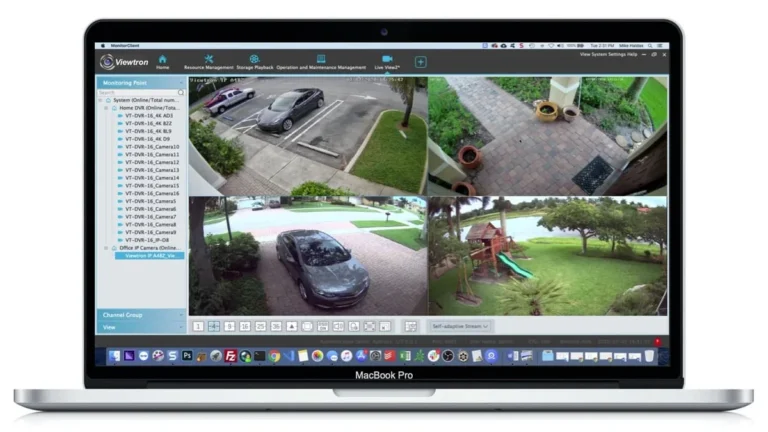
Security cameras and their associated systems, like Network Video Recorders (NVRs) or Digital Video Recorders (DVRs), represent an investment. It's easy to get carried away with top-of-the-line features, but setting a realistic budget upfront will help you prioritize. A good rule of thumb is to allocate funds for the cameras, the recording device, installation (if you're not DIYing), and potentially ongoing cloud storage fees.
A basic home security camera might cost $50-$100, while a high-end PTZ (Pan-Tilt-Zoom) camera with advanced features could run $300-$600 or more. The NVR or DVR itself can range from $150 to $500+, depending on storage capacity and channel count.
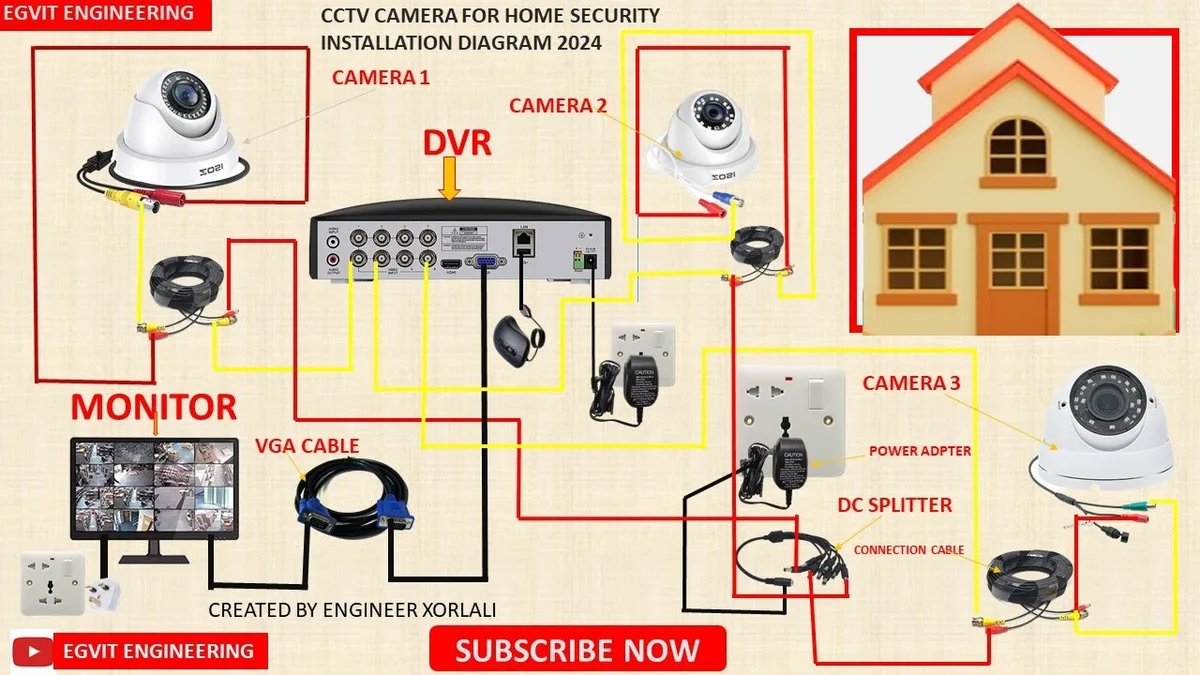
Image source: Bing (Web (fair-use with source credit))
Understanding Camera Coverage: Angles and Blind Spots
Once you know where you need eyes, the next step is understanding how each camera sees. This is all about maximizing their effectiveness and, crucially, avoiding those frustrating blind spots where something important could happen unnoticed. It’s a bit like painting a room; you need to ensure every corner is covered.
Decoding Field of View (FOV)
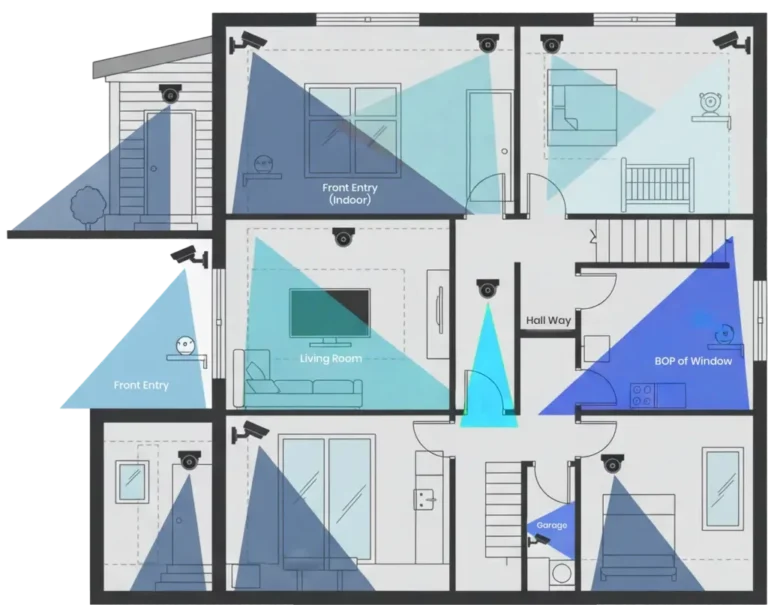
Field of View, or FOV, is how wide of an area a camera can see. It's usually measured in degrees. A wider FOV means a single camera can cover more ground, but it also means the image might be more distorted at the edges, and objects farther away can appear smaller.
A narrower FOV provides a more zoomed-in view, good for identifying details at a distance, but you'll need more cameras to cover the same area.
For example, a dome camera might have a 90-degree FOV, ideal for monitoring a room from a corner. A bullet camera might offer a wider 110-degree FOV, better for covering longer hallways or larger open spaces.
Identifying Potential Blind Spots
Blind spots are areas that your cameras simply cannot see. These can happen because of the camera's physical placement, obstructions like trees or walls, or simply the limited FOV of the camera itself. When planning your camera layout, you need to anticipate these.
A common mistake is placing cameras too high or too low, or not accounting for the way shadows can obscure vision at certain times of day.
Think about how a security guard would patrol; they'd cover entry points, hallways, and then scan the main areas. You're essentially doing the same, but with fixed points. It's often recommended to have cameras overlap their fields of view slightly.
This creates a layered security approach and ensures that if one camera’s view is blocked, another can still capture activity. If you've ever experienced issues where your security camera is delayed, it's often due to network or processing limitations, not just placement.
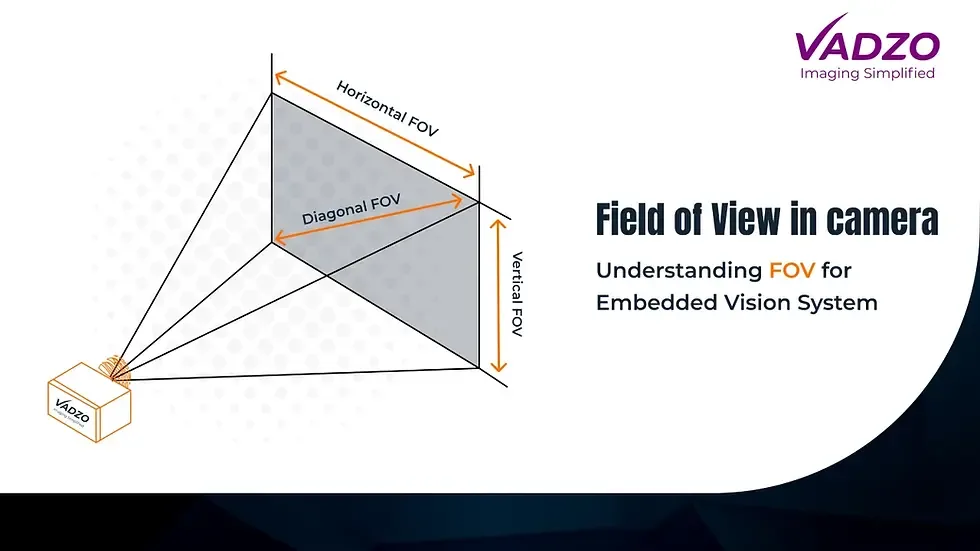
Image source: Web (Bing) / vadzoimaging.com (Web image (fair-use with source credit))
Types of Cameras and Their Roles
Not all security cameras are created equal. They come in various forms, each suited for different jobs and environments. Choosing the right type for the right spot can dramatically improve the effectiveness of your system and help you determine the total number you'll need.
IP Cameras vs. Analog Cameras: What's the Difference?
IP cameras (Internet Protocol cameras) are the modern standard. They transmit data digitally over a network, either via Wi-Fi or an Ethernet cable, often using Power over Ethernet (PoE) for both data and power. This generally results in higher image quality, greater flexibility, and more advanced features like built-in analytics.
They typically connect to an NVR.
Analog cameras, on the other hand, transmit video signals over coaxial cables. They are generally less expensive upfront but offer lower resolution and fewer features. They connect to a DVR (Digital Video Recorder).
While still found in older or budget systems, IP cameras are usually the preferred choice for new installations due to their superior performance and scalability.
Specialized Cameras: PTZ, Night Vision, and More
Beyond the basic dome or bullet shapes, specialized cameras offer unique capabilities:
- PTZ (Pan-Tilt-Zoom) Cameras: These can be remotely controlled to pan left and right, tilt up and down, and zoom in and out. They're great for covering large areas from a single point or for actively tracking movement, but they are more expensive and require more intricate setup.
- Night Vision Cameras: Essential for round-the-clock surveillance, these cameras use infrared (IR) LEDs to see in complete darkness. Look for cameras with good IR range, typically measured in feet or meters, and features like "Starlight" sensors for better color reproduction in low light.
- Weatherproof Cameras: For outdoor use, cameras need to withstand rain, dust, and temperature extremes. Look for an IP rating, with IP66 or higher being standard for robust outdoor protection.
- Audio Cameras: Some cameras include built-in microphones to capture sound along with video, which can be useful for investigations.
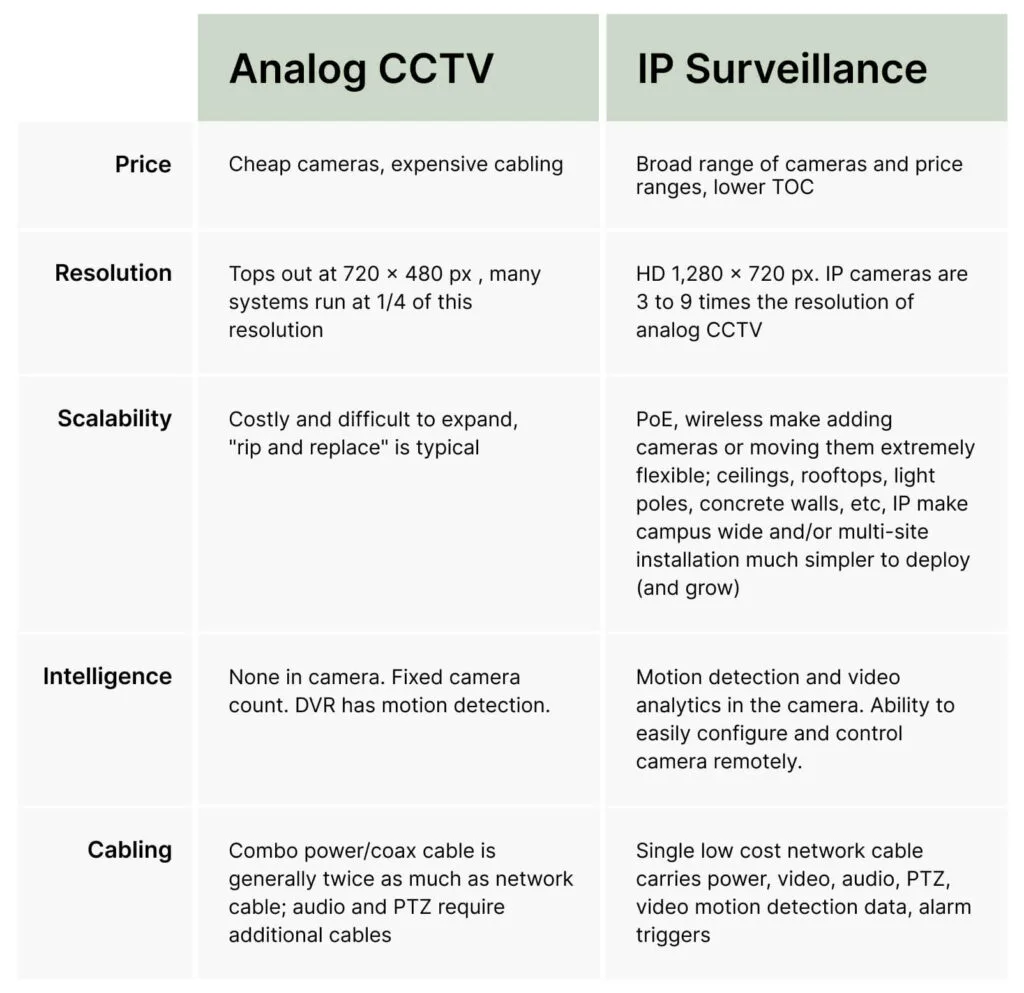
Image source: Bing (Web (fair-use with source credit))
Planning Your Camera Layout: A Step-by-Step Approach
Now that we’ve covered the basics of needs, coverage, and camera types, let’s get practical with the actual planning process. This is where you translate your security goals into a concrete camera placement strategy. Thinking through these steps will help you avoid common mistakes and ensure you get the right number of cameras without over or under-buying.
Step 1: Map Your Property
Grab a pen and paper, or use a digital tool, and sketch out a floor plan of your property. If you’re dealing with a business, try to get hold of an existing blueprint. Mark all the exterior walls, doors, windows, driveways, and any outbuildings like garages or sheds.
For interior layouts, map out rooms, hallways, main entrances, and any areas containing high-value items or sensitive operations. This visual representation is your most critical planning tool.
Step 2: Prioritize Vulnerable Zones
With your map in hand, identify the areas that pose the greatest security risk. These are your priority zones. For a home, this typically includes:
- All exterior doors (front, back, side)
- Ground-floor windows, especially those less visible from the street
- Driveways and garages
- Any secluded or easily accessible areas like back patios or balconies
For a business, priorities might include:
- Main entrances and exits
- Loading docks and delivery areas
- Cash registers and point-of-sale terminals
- Stockrooms and warehouses
- Employee entrances and parking areas
Step 3: Determine Entry and Exit Points
These are the most common pathways for unauthorized access. You absolutely need cameras covering all main entry and exit points. This includes not just doors, but also large windows that could be forced open and any access gates.
Consider the angle from which someone would approach these points to ensure your cameras capture them clearly. For instance, a camera angled slightly downwards from above a door is often more effective than one placed directly facing it.
Step 4: Consider Interior vs. Exterior Needs
Your exterior camera needs will focus on deterrence, detection of intruders, and capturing license plates or clear facial images from a distance. Interior cameras often require different specifications. For example, you might use cameras with a wider field of view to monitor large open-plan areas or office spaces.
You'll also need to think about privacy regulations and employee rights if you're installing cameras inside a business.
Step 5: Factor in Recording and Storage
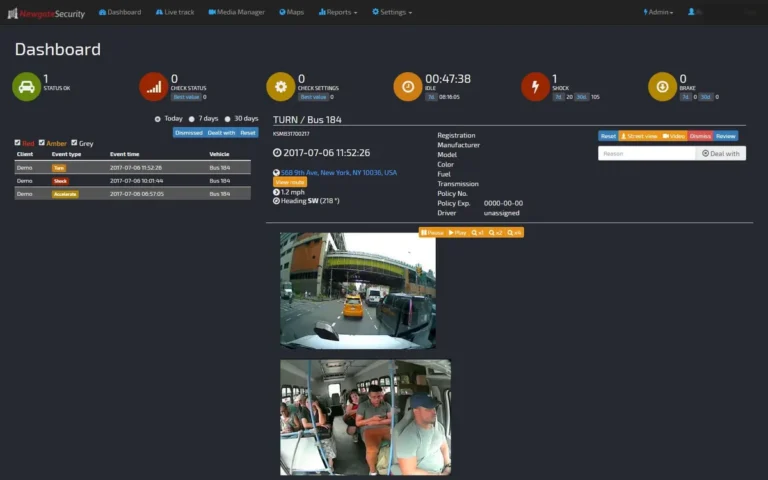
The number of cameras directly impacts your recording needs. Each camera streams data, and this needs to be stored somewhere. Your chosen recorder (NVR or DVR) must have enough channels to support the number of cameras you plan to install.
Furthermore, the hard drive capacity needs to be sufficient for the desired recording duration. For continuous recording on multiple cameras, you'll need significantly more storage than for event-based recording. Our research on how much data a security camera uses can help you estimate storage requirements based on resolution and frame rate.
Common Pitfalls to Sidestep When Buying Cameras
Many people dive into buying CCTV cameras without realizing the common traps that can lead to an ineffective or overpriced system. Avoiding these pitfalls from the outset will save you time, money, and a whole lot of frustration down the line.
The "Too Few, Too Many" Camera Trap
The most obvious mistake is either not buying enough cameras, leaving critical blind spots, or buying way more than you actually need. If you only place cameras at the front and back doors of a large house, you might miss someone trying to break in through a side window. On the flip side, placing a camera in every single room of an empty office building might be excessive and costly without adding significant value.
Strategic placement based on risk assessment is key.
Ignoring Image Quality and Night Vision
Don't be fooled by the camera count alone. A dozen low-resolution cameras might be less useful than four high-resolution ones. Image quality is paramount for identification.
As of 2026, look for at least 1080p (Full HD) resolution for clear images, with 4K becoming more common and affordable. Equally important is night vision. If your property isn't well-lit at night, cameras with robust infrared (IR) capabilities are a must.
A camera with poor night vision can render itself useless when you need it most. If you’re experiencing issues like why is my security camera blurry, it might be a combination of poor resolution and inadequate night vision.
Forgetting About Weatherproofing and Durability
If you plan to install cameras outdoors, overlooking weatherproofing is a critical error. Rain, dust, extreme temperatures, and humidity can quickly damage cameras not designed for the elements. Always check the IP (Ingress Protection) rating.
An IP66 rating, for example, means the camera is dust-tight and protected against powerful water jets. Without adequate protection, your outdoor cameras could fail prematurely, leaving your property exposed.
If your cameras are also exposed to physical tampering or vandalism, consider cameras with vandal-resistant housings. This is particularly important for businesses in public-facing areas or homes in areas with a higher risk of crime.
Setting Up Your System: Recorders and Connections
Once you’ve determined the cameras you need and where they’ll go, the next piece of the puzzle is the backbone of your surveillance system: the recorder and how everything connects. This is where your video feeds converge and get stored, so choosing the right components is just as crucial as selecting the cameras themselves. Getting this right ensures a reliable and accessible system.
NVR vs. DVR: Choosing Your Recorder
Your primary recording device will be either a Network Video Recorder (NVR) or a Digital Video Recorder (DVR). The choice usually depends on the type of cameras you’re using.
- NVRs are designed for IP cameras. They receive digital video streams directly from the network. NVRs offer greater flexibility and scalability, often supporting higher resolutions and more advanced analytics. They typically connect to cameras via Ethernet cables.
- DVRs are used with analog cameras. They receive analog video signals through coaxial cables and convert them into digital data for recording. DVR systems are generally simpler and can be a more budget-friendly option if you're working with older analog cameras or a limited number of cameras.
When deciding, consider the maximum number of cameras you plan to support. Recorders are sold by channel count (e.g., 4-channel, 8-channel, 16-channel). You’ll want a recorder with at least a few spare channels for future expansion.
Wiring and Power Considerations (PoE Explained)
How your cameras get power and data is a key logistical detail. For IP cameras, Power over Ethernet (PoE) is a game-changer. PoE technology allows a single Ethernet cable to transmit both data and electrical power to the camera.
This significantly simplifies installation, as you don't need to run separate power cables to each camera location, which can be a huge advantage for outdoor or hard-to-reach spots.
A PoE-enabled switch or an NVR with built-in PoE ports will power your cameras. If you're not using PoE, you'll need to run a separate power cable alongside the video cable for each camera, which can be more complex and costly. The distance limitations for Ethernet cables (around 100 meters or 328 feet) also come into play; if cameras are farther away, you might need network extenders or fiber optic solutions, which can complicate setup.
If you experience issues with how to improve security camera WiFi signal, ensuring strong wired connections for critical cameras is often the first step.
FAQs: Your Burning Questions Answered
### How many CCTV cameras do I need for a typical two-story house?
For a standard two-story house, you'll likely need between 4 and 8 cameras. Focus on key entry points like front and back doors, ground-floor windows, and perhaps the garage. A couple of cameras for the front and back exterior, and one or two for main interior areas like the living room or hallway, often suffice for good coverage.
### Can I use fewer cameras if I get really high-resolution ones?
While higher resolution (like 4K) offers much clearer detail and can sometimes cover a larger area with better identification, it doesn't entirely replace the need for strategic placement. A single 4K camera might cover more ground than a 1080p one, but you still need to account for corners, obstructions, and specific angles of approach. Overlapping fields of view from multiple cameras often provide more robust security than relying on just one or two very high-resolution units.
### How much does a typical 4-camera CCTV system cost?
A basic 4-camera CCTV system, including cameras, an NVR or DVR, and necessary cabling, can range from $300 to $800 for a DIY setup. Professional installation will add an additional $200 to $1000+, depending on complexity and labor rates. This cost can increase significantly with higher-end cameras, larger storage capacities, or specialized features.
### Should I prioritize indoor or outdoor cameras for a business?
For businesses, outdoor cameras are generally the priority for deterring crime and capturing external activity. However, interior cameras are also crucial for monitoring operations, employee activity, and preventing internal theft or vandalism. A balance is needed, with external cameras focused on access points and perimeter, while internal cameras cover high-traffic areas, cash handling zones, and stock.
### What are the legal considerations for placing CCTV cameras?
Legal considerations vary by region and are especially important for businesses. You generally need to consider privacy laws, particularly concerning audio recording or cameras placed in areas where people have a reasonable expectation of privacy (like restrooms or break rooms). For businesses, signs informing people they are under surveillance are often required.
It's wise to consult local regulations or a legal professional regarding compliance.