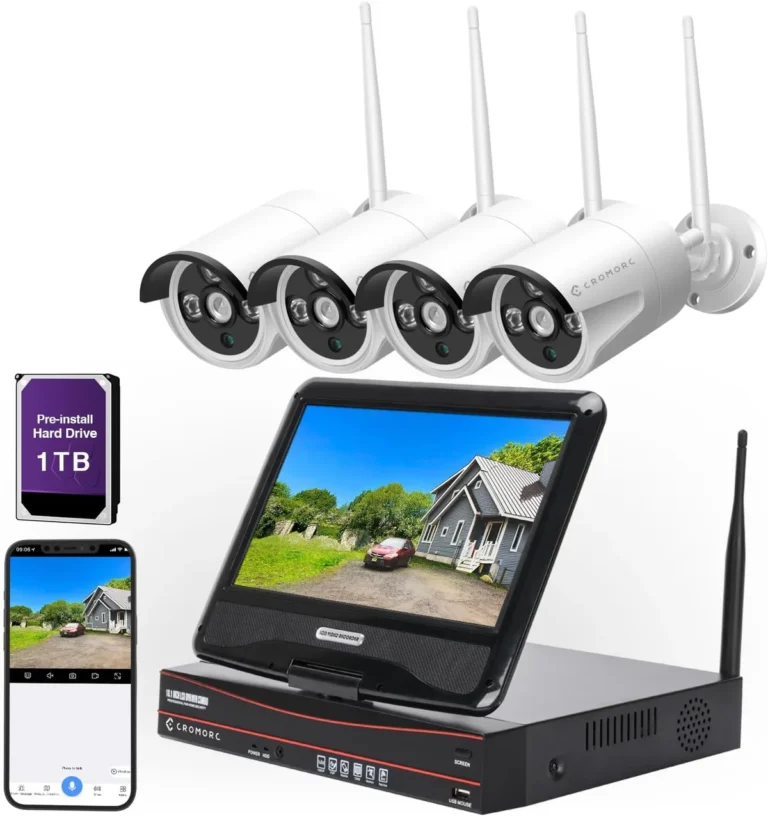
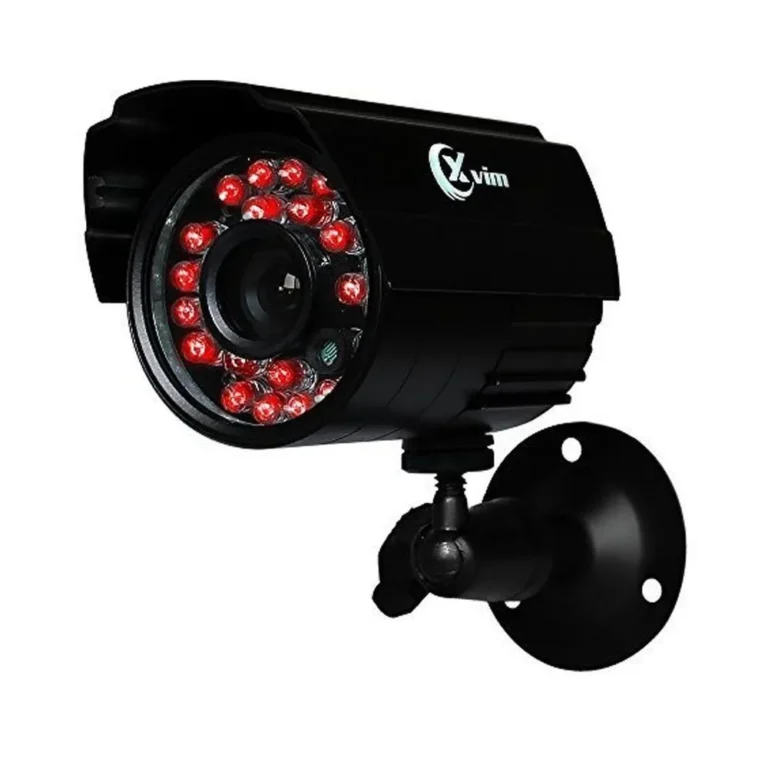
Can CCTV Cameras Record Conversations?
When you're setting up or reviewing your security system, you might wonder if your CCTV cameras are capturing more than just video. The exact question is, "Can CCTV cameras record conversations?" The answer isn't a simple yes or no; it really depends on the specific camera you have and its built-in features, as well as what's legally permissible where you are.
Many modern security cameras are designed with more than just a lens. Our research indicates that a significant percentage of contemporary surveillance cameras include microphones, allowing them to capture audio alongside video. Manufacturer specifications often detail audio capabilities, with some models offering clear sound recording up to 15 meters (around 50 feet), depending on ambient noise.
This capability can offer a more complete picture of events, but it also brings privacy and legal considerations into play, which we'll explore.
Quick Answer
Yes, many CCTV cameras can record conversations if they are equipped with a microphone. However, the ability and legality of doing so depend entirely on the camera's features and your local laws. Not all security cameras have audio recording capabilities.
What's Actually Recording: Audio vs. Video
It's easy to assume all security cameras capture sound, but that's not the case. Think of your security camera system like a two-part operation: video and audio. For a camera to record conversations, it absolutely needs a microphone.
Without one, it's purely a visual recording device, no matter how high the video resolution.
When Cameras Can Record Sound
A CCTV camera is capable of recording conversations if it has either a built-in microphone or an input for an external microphone. Many cameras designed for comprehensive surveillance, particularly indoor models or those meant for business monitoring, come with integrated microphones. These are often positioned discreetly on the camera body.
- Integrated Microphone: This is the most common setup. The microphone is part of the camera's internal hardware, working alongside the video sensor to capture both streams simultaneously.
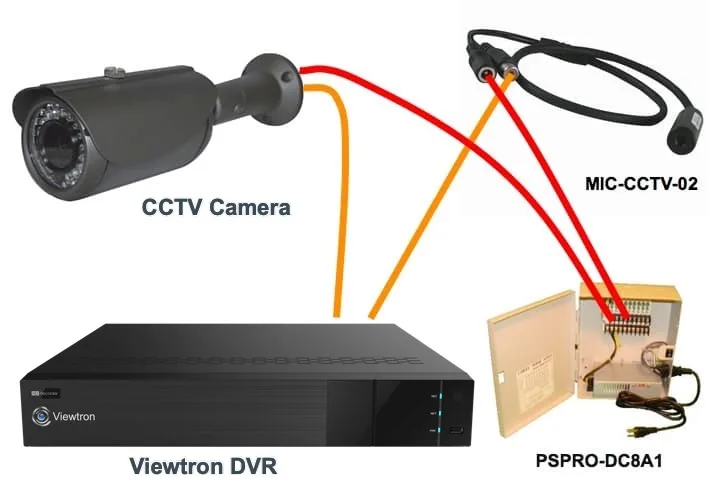
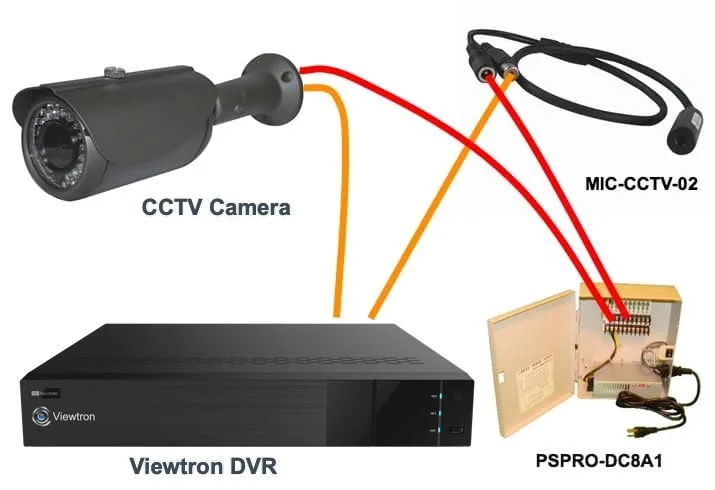
- External Microphone Input: Some cameras, especially higher-end or professional-grade models, might not have a built-in mic but offer a port to connect an external one. This allows for more flexibility in placement and potentially better audio quality depending on the microphone used.
If your camera has a microphone, the system will typically record both audio and video streams to its storage. This dual recording provides richer data, useful for verifying events or understanding the full context of a situation.
When They Can't (or Shouldn't)
If a CCTV camera was manufactured without any audio recording components, it simply cannot capture sound. This is common for older models or basic outdoor cameras focused solely on visual deterrence and evidence. Even if a camera can record audio, there are significant reasons why you might choose not to.
The primary concern is legal and ethical. Recording conversations without the consent of all parties involved can lead to serious legal trouble, depending on your location's laws. Additionally, in noisy environments, audio recordings can be filled with static, wind noise, or background chatter, making it difficult to discern actual conversations.
The Crucial Features: What to Look For
When you're looking at CCTV cameras, especially if capturing audio is important for your needs, paying attention to specific features makes all the difference. It’s not just about whether it can record audio, but how well it does it and what options you have for customization.
Built-in Microphones vs. External Inputs
This is the main distinction when it comes to audio on CCTV cameras. Understanding the difference helps you choose the right hardware for your setup and ensures you're getting the audio quality and flexibility you need.
- Built-in Microphone:
- Pros: Simplest setup, no extra wiring needed. Plug-and-play convenience for basic audio capture.
- Cons: Microphone quality can vary widely. Placement is fixed with the camera, so its effectiveness depends on the camera's location relative to sound sources. Can be more susceptible to background noise if not well-designed.
- External Microphone Input:
- Pros: Offers greater flexibility. You can choose a higher-quality microphone optimized for sound capture. Allows you to place the microphone closer to the sound source than the camera might be. Can be better for overcoming ambient noise in specific areas.
- Cons: Requires additional wiring and setup. Adds complexity to installation. You need to ensure compatibility between the camera's input and the external microphone.
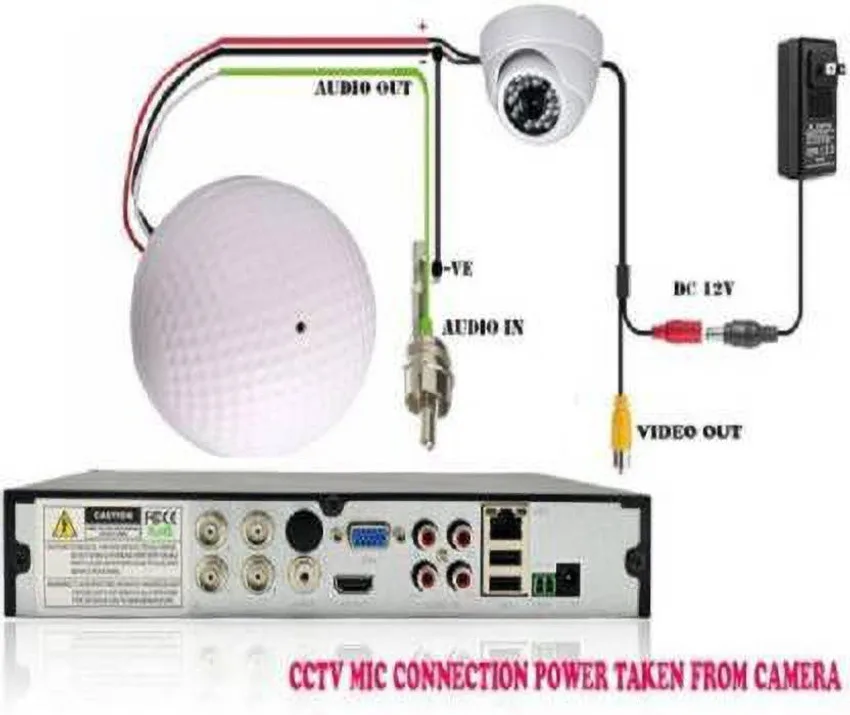
When evaluating specifications, look for details on the microphone's pickup range, its frequency response, and any noise reduction technology the camera might employ. Some manufacturer specifications, for instance, might list an audio pickup range of up to 30 feet for cameras with good noise suppression.
Understanding Your Local Laws: Recording Conversations
This is hands-down the most critical aspect if you’re considering audio recording with your CCTV system. Failing to understand and comply with these laws can lead to significant legal penalties, including hefty fines and even criminal charges. Laws vary dramatically by state and country, so doing your homework is non-negotiable.
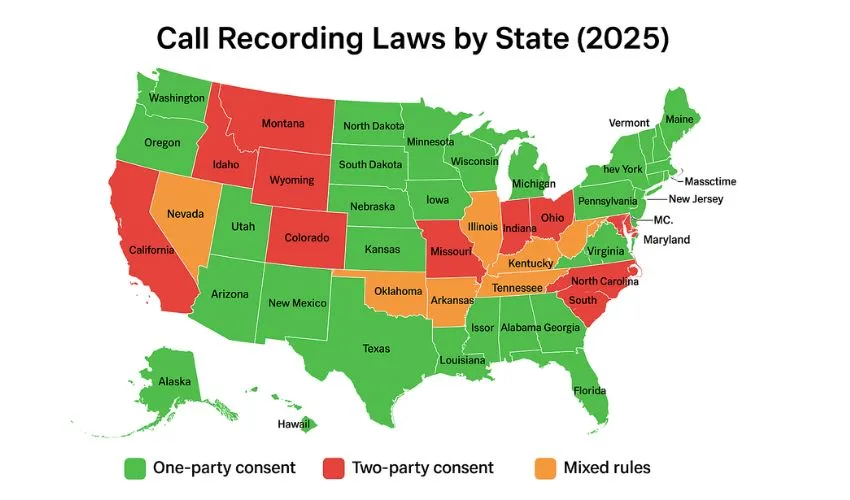
Consent Requirements: One-Party vs. Two-Party
The core of audio recording legality often hinges on consent. There are two main types of consent laws that dictate whether you need permission from everyone involved in a conversation to record it.
- One-Party Consent: In states or jurisdictions with one-party consent laws, only one person involved in the conversation needs to give their consent to record it. This means if you are a party to the conversation, you can legally record it without informing the other participants.
- Two-Party Consent (or All-Party Consent): In contrast, jurisdictions with two-party consent laws require that all parties involved in a conversation must consent to the recording. If you are in such a location, you must obtain explicit permission from everyone whose conversation you wish to capture.
Our research shows that over a dozen U.S. states operate under two-party consent laws, making it illegal to record conversations without the agreement of all participants. Always verify the specific laws in your state and the states where your cameras are operating.
Where You Can (and Can't) Record
Beyond consent laws, the location where you are recording also plays a significant role. There's a general expectation of privacy in certain areas that recording can violate, even if consent laws seem to permit it. Recording in places where people have a reasonable expectation of privacy, such as bathrooms, private offices without consent, or inside someone's home, is generally illegal and unethical, regardless of consent laws.
Public spaces, like streets or open-plan retail areas, often have a lower expectation of privacy, but laws still apply. For example, while you might be able to record general ambient sound in a public square, actively eavesdropping on specific conversations could still be problematic. It’s always best practice to post clear signage indicating that audio recording is in progress in any area under surveillance.
Real-World Scenarios: When Audio Makes a Difference
While video provides visual proof, adding audio can significantly enhance the value of your CCTV system. It turns a silent movie into a full-sensory record, offering crucial context and detail that video alone might miss. However, it's important to weigh these benefits against the legal and practical challenges.
Home Security: Hearing More Than Just a Break-in
For homeowners, audio recording on CCTV cameras can offer more than just a visual deterrent. Imagine a scenario where someone approaches your door; video shows their face, but audio might capture them speaking to someone else, making a threat, or discussing their intentions. If there's a fire or a CO alarm, audio can confirm the sound, providing an earlier alert.
If you’re away, hearing an alarm sound can prompt a quicker response than waiting for a notification that might rely solely on motion detection. It also helps in identifying unexpected visitors or distinguishing between different types of noises like a pet, a delivery person, or something more sinister.
Business Surveillance: Evidence and Operations
In commercial settings, audio recording can be invaluable for a range of applications. It can help resolve customer disputes by providing a clear account of conversations, whether it's a sales interaction, a service complaint, or a delivery issue. For businesses with employee monitoring, audio can offer insights into workplace conduct, client interactions, and adherence to protocols, though this is heavily regulated.
It’s also crucial for capturing evidence in cases of theft, vandalism, or altercations. Some businesses utilize audio to monitor the performance of customer service staff or to ensure compliance with safety procedures by hearing instructions or warnings being given. For example, a retail store might use audio to understand customer feedback during an interaction or to capture instances of shoplifting being discussed.
Understanding how to save security camera footage is key, whether it includes audio or not.
Common Mistakes When Using Audio Recording
Even with the best intentions, people often make mistakes when setting up or using audio recording on their CCTV systems. These errors can range from simple technical oversights to serious legal missteps. Being aware of these pitfalls can save you a lot of trouble down the line.
Privacy Pitfalls
The most significant mistake is recording conversations without proper consent. This isn't just about breaking the law; it's about respecting people's privacy. Recording employees in break rooms, family members without their knowledge, or customers in private consultation areas without explicit consent is a major privacy violation.
Always ensure you understand and adhere to your local consent laws, and consider posting clear signage indicating audio recording is active, as recommended by organizations like the Electronic Frontier Foundation (EFF). This transparency is crucial.
Technical Glitches and Poor Sound Quality
Another common error is assuming that just because a camera has a microphone, the audio will be crystal clear. Many systems suffer from poor audio quality due to several factors. Background noise, like traffic, wind, or machinery, can drown out actual conversations.
If the microphone is too far from the sound source, the audio will be faint and indistinct. Some users also forget that audio adds to the data storage requirements; if storage is limited, audio might be the first thing to be dropped or compressed to the point of being unusable. If your cameras are experiencing connectivity issues affecting their recording capabilities, understanding how to improve security camera WiFi signal can be a practical step towards a more reliable system.
Making the Right Choice: A Decision Guide
Deciding whether to enable audio recording on your CCTV cameras involves weighing the benefits against the risks and technical requirements. It's not a feature everyone needs, and for some, the added complexity and legal exposure aren't worth it.
When to Prioritize Audio Recording
Audio recording is particularly beneficial when the context of an event is as important as the visual evidence. This applies in situations where spoken words are critical, such as:
- Verifying threats or conversations: For example, in a retail setting, hearing the exact words used during a dispute can be vital.
- Capturing alarms or specific sounds: Detecting the sound of a breaking window or a smoke alarm can provide an earlier alert than visual cues alone.
- Employee performance monitoring: In regulated environments, audio can help ensure staff are following procedures or providing accurate customer service.
If your primary goal is simply to deter intruders or visually identify individuals, high-quality video might suffice. However, for detailed event reconstruction or to gain a fuller understanding of what transpired, audio becomes indispensable.
When to Stick to Video Only
For many residential or small business setups, audio recording might introduce more problems than it solves. If your main concern is deterring trespassers or visually identifying individuals, video-only cameras are perfectly adequate and significantly simplify compliance. The legal landscape surrounding audio recording is complex and varies widely, so if you're unsure about consent laws or prefer to avoid the risk, sticking to video is the safest and easiest route.
Additionally, if your surveillance area is inherently noisy or if reliable, clear audio capture is technically challenging and expensive to achieve, you might find that video alone offers a better return on investment. For instance, if your camera is mounted high up on a street corner, capturing clear conversations is unlikely, making the video feed the sole valuable component.
Frequently Asked Questions About CCTV Audio
Do all CCTV cameras come with microphones?
No, not all CCTV cameras are equipped with microphones. While many modern cameras include them for enhanced surveillance, older models or basic outdoor cameras often rely solely on video capture. Always check the product specifications to confirm audio capabilities.
Is it legal to record conversations with my security cameras?
Legality depends heavily on your location's specific laws regarding consent. In some places, you only need one person's consent to record (one-party consent), while in others, all parties must agree (two-party consent). Recording in areas where people have a reasonable expectation of privacy without consent can be illegal.
How does audio recording affect my storage needs?
Audio files add to the data your system needs to store. While video is typically the larger data consumer, continuous audio recording can significantly increase the overall storage requirement. This might mean needing a larger hard drive or opting for a higher-capacity cloud storage plan.
Our research shows that audio can add between 10-30% to storage needs depending on bitrate and recording duration.
Can I add a microphone to a camera that doesn't have one?
Some CCTV cameras are designed with external microphone inputs. If your camera has such a port, you can often connect a compatible external microphone to enable audio recording. However, cameras without any audio input capabilities cannot be retrofitted with sound recording features.
Expert Advice for Clearer Audio and Compliance
Maximizing the usefulness of audio on your CCTV system while staying out of legal trouble requires a strategic approach. It’s about smart setup and constant awareness of regulations.
To ensure you get the clearest possible audio, consider the placement of your microphones. If using external microphones, position them as close as possible to the areas where conversations are likely to occur. For cameras with built-in mics, try to avoid obstructions and minimize background noise sources.
Regularly check your system's audio settings to ensure the right levels are selected and any noise reduction features are active. For instance, if you’re experiencing audio lag, you might need to look into how to fix security camera video lag as it can sometimes be related to how audio and video streams are processed together.
When it comes to compliance, staying informed is your best defense. Make it a habit to review local and state laws regarding audio recording at least once a year, as they can change. If you operate a business, consult with a legal professional to ensure your practices meet all requirements, especially concerning employee monitoring.
Posting clear, visible signage indicating that audio recording is in progress is a universally recommended practice. This transparency helps prevent accidental violations and manages expectations for visitors and employees alike.