How to Tell If a Security Camera Has Been Hacked
Image source: Web (Bing) / mumble.nationalgeographic.com (Web image (fair-use with source credit))
When your security cameras stop behaving normally, it's natural to worry if they've been compromised. Learning how to tell if a security camera has been hacked is crucial for protecting your privacy and property. This guide breaks down the subtle and not-so-subtle signs of a breach, helping you act fast.
Our research shows that while many cameras offer robust security, vulnerabilities can still exist. The key is recognizing when something is off, whether it's unusual activity on your network or strange behavior from the camera itself. For instance, according to guidelines from the National Institute of Standards and Technology (NIST), consistent firmware updates are a baseline security measure for Internet of Things (IoT) devices like cameras.
Quick Answer
Yes, security cameras can be hacked, and there are definite signs. Look for odd camera movements, unexpected reboots, or strange noises. Monitor your network for unusual data usage from the camera.
Always change default passwords and keep firmware updated to prevent unauthorized access.
Signs Your Security Camera Might Be Compromised
If you suspect your security camera has been hacked, the first step is to look for signs that something is amiss. These indicators often appear as deviations from normal operation, subtle glitches, or unexpected alerts. Recognizing these early warnings can help you catch a potential breach before significant damage occurs.
Unusual Camera Behavior
Your security camera might start acting in ways that aren't typical for its normal function. This could manifest as the camera physically moving on its own, even if it's not programmed to pan or tilt. You might also notice the camera's indicator lights behaving erratically, or the device powering on or off at odd times without your input.
Sometimes, a hacked camera might even disconnect from your network unexpectedly and then reconnect without a clear reason.

Image source: Web (Bing) / stockcake.com (Web image (fair-use with source credit))
- Camera Movement: Pan, tilt, or zoom functions activating without a command.
- Indicator Lights: Blinking, changing color, or staying on/off when they shouldn't.
- Power Cycles: Unexpected reboots or the camera turning off entirely.
- Connectivity Issues: Frequent disconnections and reconnections from your network.
Strange Network Activity
Your security camera connects to your home network, and any unauthorized access will likely show up there. A hacked camera might start sending or receiving data at unusual times or in much larger volumes than normal. This can strain your internet connection or appear as suspicious traffic when you review your router's logs.
Some routers offer network monitoring tools that can flag unusual device behavior.
- Increased Data Usage: A significant spike in data consumption from the camera's IP address.
- Unfamiliar Connections: The camera attempting to connect to unknown IP addresses or servers.
- Network Alerts: Your router's security features flagging the camera as a potential threat.
Unexpected Changes to Settings
Hackers can sometimes alter a camera's settings to facilitate their access or to hide their tracks. This could mean changes to the camera's resolution, frame rate, or even disabling features like motion detection if they're trying to conduct stealthy surveillance. You might also find that your saved recordings have been tampered with or deleted.
It’s also possible that the device’s default security settings have been re-enabled or altered.
- Configuration Alterations: Changes to video quality, recording schedules, or alert settings.
- Feature Disablement: Motion detection, night vision, or audio recording suddenly turned off.
- Access Control: New user accounts appearing or your own account being restricted.
Investigating a Potential Security Camera Hack
Once you've spotted some suspicious signs, it's time to dig deeper. A thorough investigation involves checking the logs your camera and network devices keep, analyzing network traffic, and ensuring your camera's software is up-to-date. This process helps confirm if a hack has occurred and provides evidence of unauthorized access.
Checking Camera Logs and Activity
Most security cameras keep logs of their activity, which can be invaluable for spotting anomalies. These logs typically record login attempts, system reboots, and configuration changes. By reviewing these records, you can often identify when unauthorized access might have occurred.
Accessing these logs usually requires logging into your camera's web interface or its dedicated mobile app.
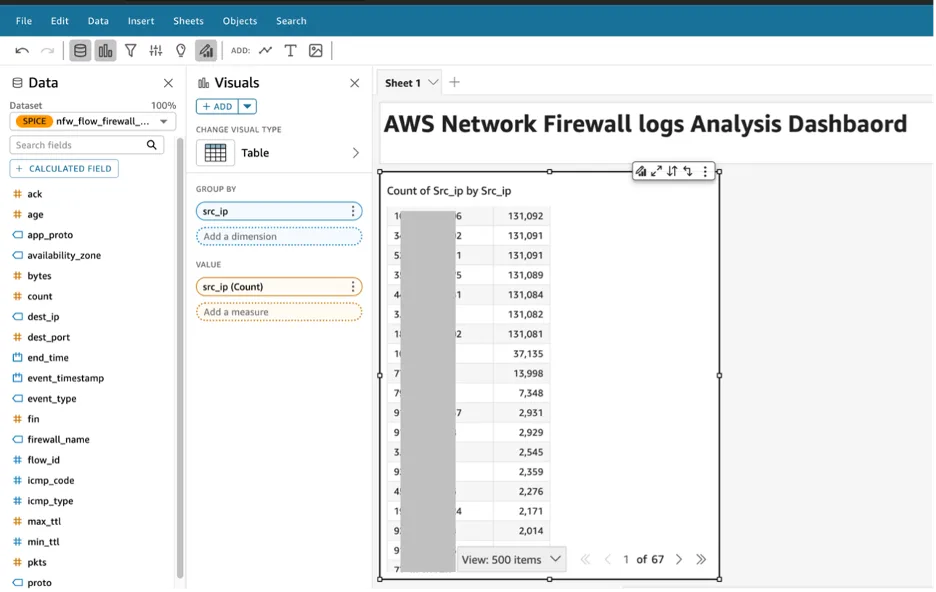
Image source: Bing (Web (fair-use with source credit))
- Login Records: Look for login attempts from unknown IP addresses or at unusual times.
- Event Timestamps: Correlate timestamps in the camera log with any unusual behavior you noticed.
- Configuration History: Check for any settings changes that you did not make.
Examining Your Network Traffic
Monitoring your network traffic can reveal suspicious communication patterns. Tools available on many routers allow you to see which devices are connected and how much data they are using. If your security camera is suddenly communicating with unfamiliar servers or consuming an unexpectedly high amount of bandwidth, it's a red flag.
This is particularly relevant if you're running a wireless home security system.
- Data Usage Monitoring: Identify if the camera's data usage deviates significantly from its baseline.
- IP Address Tracking: Note any external IP addresses your camera is communicating with.
- Port Scans: Observe if the camera is attempting to access unusual network ports.
Verifying Firmware and Software Updates
Outdated firmware or software is one of the most common entry points for hackers. Manufacturers release updates to patch security vulnerabilities. If your camera's firmware is old, it might be susceptible to known exploits.
Always ensure your camera is running the latest version available from the manufacturer. This is a critical step in securing any smart home security system.
- Check Current Version: Find out what firmware version your camera is currently running.
- Visit Manufacturer Site: Go to the official website of your camera's brand and check for the latest firmware releases.
- Install Updates: Follow the manufacturer's instructions to update your camera's firmware, which is essential for maintaining a smart home security system.
What to Do If Your Security Camera Is Hacked
If you've confirmed or strongly suspect your security camera has been hacked, immediate action is critical to regain control and prevent further compromise. The goal is to isolate the compromised device, secure your network, and change any potentially exposed credentials. Acting swiftly minimizes the risk of privacy invasion and data theft.
Immediate Steps to Secure Your System
The very first thing you should do is disconnect the compromised camera from your network. This can be done by unpluging its power cable or, if it's connected via Ethernet, unplugging the network cable. If the camera is wireless, you might also consider temporarily disabling your Wi-Fi or changing your Wi-Fi password to prevent the hacker from re-establishing a connection to other devices on your network.
This isolation step is crucial.
- Disconnect the Camera: Unplug its power or network cable immediately.
- Isolate Your Network: If possible, temporarily change your Wi-Fi password to lock out unauthorized access.
Changing Passwords and Network Credentials
Once the camera is isolated, you need to assume that any credentials used to access it, or your network, might have been compromised. This includes your camera's login password, your Wi-Fi password, and potentially passwords for any associated cloud accounts. Use strong, unique passwords for each service and consider enabling two-factor authentication where available.
This is a core security practice for any smart home security system.
- Camera Password: Change the camera's login credentials to a strong, unique password.
- Wi-Fi Password: Update your router's Wi-Fi password to a complex combination of letters, numbers, and symbols.
- Cloud Account Passwords: Reset passwords for any associated cloud storage or service accounts.
When to Contact Professionals
If you're not comfortable performing these steps yourself or if you suspect the hack has affected more than just your camera (e.g., other devices on your network, personal data), it's wise to seek professional help. Cybersecurity experts can assist in thoroughly investigating the breach, cleaning your network, and advising on more robust security measures. This is especially important if you suspect any financial or personal data has been compromised.
- Complex Breaches: If multiple devices or sensitive data are involved.
- Lack of Confidence: If you're unsure about performing technical security steps.
- Ongoing Issues: If the problem persists after your initial actions.
Protecting Your Security Cameras from Future Hacks
Preventing future hacks is as important as addressing an existing one. It involves a multi-layered approach to security, focusing on the camera itself, your network, and your general online habits. By implementing these measures, you significantly reduce the risk of your surveillance equipment falling into the wrong hands.
This proactive approach ensures your peace of mind.
Strengthening Your Wi-Fi Network
Your Wi-Fi network is the gateway for most smart cameras. Ensure you're using robust security protocols, ideally WPA2 or WPA3 encryption, and a strong, unique password. Avoid using default router credentials.
Some routers also allow you to create a separate "guest" network, which can be used for your IoT devices like security cameras, isolating them from your primary network where your computers and phones reside. This separation can limit the damage if a device on the guest network is compromised.
- Encryption Type: Use WPA2 or WPA3 encryption.
- Strong Passwords: Create unique and complex passwords for your Wi-Fi network.
- Guest Network: Consider a separate network for IoT devices.
Choosing Secure Camera Models
When purchasing new security cameras, prioritize models from reputable manufacturers known for their commitment to security. Look for cameras that regularly receive firmware updates and have a good track record for addressing security vulnerabilities. Researching a camera's security features before buying can save you a lot of trouble down the line.
Some brands provide specific details about their security protocols and data handling practices.
- Reputable Brands: Opt for manufacturers with a strong security reputation.
- Update Frequency: Check how often the manufacturer releases firmware updates.
- Security Features: Look for cameras that support encryption and secure remote access.
Implementing Best Practices for Remote Access
If your camera allows remote viewing, ensure this feature is secured properly. Always use strong, unique passwords for any accounts linked to remote access. If possible, enable two-factor authentication (2FA) for an extra layer of security.
Avoid accessing your cameras from public, unsecured Wi-Fi networks, as these can be easily monitored by others. For truly robust security, consider whether remote access is absolutely necessary or if a more secure, limited access method suffices.
- Two-Factor Authentication (2FA): Enable this whenever available for remote accounts.
- Secure Networks: Avoid accessing cameras on public Wi-Fi.
- Review Access: Periodically check who has access to your camera feeds.
Common Mistakes That Leave Cameras Vulnerable
Many security camera vulnerabilities stem from simple oversights that hackers can easily exploit. Being aware of these common pitfalls can help you avoid them and bolster your camera's security. These mistakes often involve default settings, weak credentials, and neglecting regular maintenance.
Understanding these risks is the first step toward prevention.
- Using Default Passwords: Hackers know default credentials for many camera models and will try them first. Always change them immediately upon setup.
- Ignoring Firmware Updates: Manufacturers release updates to patch security holes. Failing to update leaves your camera exposed to known exploits.
- Unsecured Wi-Fi: A weak or easily guessable Wi-Fi password gives hackers direct access to your network, including your cameras.
- Over-Sharing Remote Access: Granting remote access unnecessarily or using weak credentials for it opens up a major security risk.
- Placing Cameras in Obvious Locations: While not a direct hack, highly visible, easily accessible cameras can be physically tampered with or their view obstructed by attackers.
- Lack of Network Segmentation: Connecting all your smart devices, including cameras, to the same network can allow a hack on one device to spread to others.
Using Your Camera's Log Files to Spot Intruders
When you suspect your security camera might have been compromised, its internal logs are a treasure trove of information. These records offer a chronological account of events, detailing who logged in, when, and what actions were taken. By carefully examining these logs, you can often pinpoint the exact time an unauthorized intrusion might have occurred.
Most modern cameras, whether part of a wired vs wireless home security system, log events like system restarts, firmware changes, and login attempts.
Accessing these logs usually involves logging into the camera's administration interface via a web browser or its dedicated mobile application. You'll typically find a section labeled "Logs," "Event History," or "System Records."
- Login Activity: Look for any entries showing logins from IP addresses you don't recognize or at times when you weren't actively using the camera.
- Configuration Changes: Check for modifications to settings like resolution, frame rate, or motion detection sensitivity that you didn't perform.
- System Events: Note any unexpected reboots, firmware updates initiated without your command, or network disconnections.
By cross-referencing these log entries with your own activity and network monitoring data, you can build a clearer picture of potential unauthorized access. It's a critical step in understanding what happened and how to prevent it in the future.
What Your Router's Network Traffic Can Tell You
Your router acts as the central hub for all devices on your home network, including your security cameras. Monitoring the network traffic can reveal if your camera is behaving unusually. For example, a hacked camera might start sending a significant amount of data to an unfamiliar server, or it might attempt to connect to known malicious IP addresses.
Examining your router's logs can provide tangible evidence of suspicious activity.
Many routers offer a feature that shows connected devices and their data usage. If you notice your camera suddenly consuming much more bandwidth than usual, especially during times when you're not actively viewing its feed, that's a major warning sign. This increased traffic could be the hacker transferring recorded data or using the camera to launch other attacks.
- Data Consumption: Compare current data usage to historical averages for the camera.
- Connected Devices: Ensure only known devices are listed and active on your network.
- External Connections: Note any unusual external IP addresses your camera is communicating with, which could indicate malicious communication.
Why Firmware Updates Are Non-Negotiable
Keeping your security camera's firmware up-to-date is one of the most effective ways to prevent hacks. Manufacturers release firmware updates to patch security vulnerabilities that hackers might exploit. Older firmware versions can contain well-documented security flaws that are easy targets for automated attacks.
For instance, a 2026 security advisory from the Cybersecurity and Infrastructure Security Agency (CISA) highlighted several common vulnerabilities in IoT devices that were addressed in subsequent firmware patches.
Neglecting these updates is akin to leaving your digital doors unlocked. Always visit the manufacturer's official website to download and install the latest firmware for your specific camera model. This process typically involves accessing your camera's web interface or app and following the provided update instructions.
It’s a fundamental aspect of maintaining a secure home alarm system.
- Vulnerability Patching: Updates fix security holes, preventing known exploits.
- Manufacturer Guidance: Always use firmware directly from the camera's official support page.
- Regular Checks: Schedule regular checks for new firmware releases to stay protected.
When to Suspect Tampering Beyond Software
While most hacks involve software vulnerabilities, it's also important to consider the possibility of physical tampering. A determined intruder might try to disable or interfere with your camera directly, especially if it's easily accessible. This could range from simply blocking the lens to more sophisticated methods of disabling the device.
Recognizing these physical signs is crucial for a complete security assessment.
Physical tampering can often be more obvious than software hacks, but it still requires a careful eye. Look for any signs of damage to the camera's casing, lens, or mounting. If a camera that was previously working suddenly stops functioning without any network or power issues, physical interference should be a strong consideration.
This is where understanding what a home security system includes becomes relevant, as tampering with one component can affect others.
Signs of Physical Interference
- Damaged Casing: Look for scratches, dents, or signs that the camera has been pried open.
- Obstructed Lens: Check if the camera's view is blocked by tape, paint, or physical objects you didn't place.
- Loose Mounts: Ensure the camera is securely fastened and hasn't been deliberately loosened or dislodged.
- Disconnection: A camera suddenly going offline without any power or network issues might have been physically disconnected or damaged.
The Role of Weak Passwords in Camera Breaches
Perhaps the single most common reason security cameras get hacked is the use of weak, default, or easily guessable passwords. Many users don't change the factory-set passwords, leaving their cameras wide open to brute-force attacks. Hackers often maintain lists of default credentials for popular camera models and will try them systematically.
This oversight can grant them full control over your camera's feed and potentially your entire network.
A strong password is a complex combination of uppercase and lowercase letters, numbers, and symbols, at least 12-15 characters long. It's also vital to use a unique password for each device and online account. If you're struggling to remember numerous strong passwords, a reputable password manager can be an invaluable tool for keeping them secure and accessible.
This practice is fundamental for anyone with a smart home security system.
- Default Credentials: Always change from the manufacturer's default password immediately.
- Password Strength: Use a mix of characters, numbers, and symbols; aim for length.
- Uniqueness: Never reuse passwords across different devices or accounts.
- Password Managers: Consider using a tool to generate and store strong, unique passwords.
Frequently Asked Questions About Hacked Security Cameras
Can someone see through my camera without me knowing?
Yes, if your camera is hacked, someone can potentially view your live feed or recorded footage without your knowledge. Signs include unexpected camera movements or odd indicator lights.
How often should I change my camera password?
It's best practice to change your camera's password regularly, especially if you suspect any unusual activity. A good rule of thumb is every six months, or immediately after any security scare.
What is the difference between a firmware update and a software update?
Firmware is low-level software embedded in hardware, like your camera, controlling its basic functions. Software is a higher-level program, like a mobile app, used to interact with the camera. Both need regular updates for security.