How Many Cameras Can a CCTV DVR Support?
When you're setting up or expanding a security camera system, one of the first big questions is: "How many cameras can a CCTV DVR support?" It's a crucial detail because buying more cameras than your recorder can handle means they just won't work. You need to match your camera needs to your DVR's capabilities.
Manufacturer specifications consistently indicate that the maximum number of cameras a CCTV DVR can support is determined by its designated channel count. For instance, a typical 8-channel DVR, as defined by industry standards like ONVIF, can interface with up to eight individual camera feeds simultaneously, as long as they meet the required bandwidth and resolution specifications.
Quick Answer
A CCTV DVR supports a number of cameras equal to its channel count. A 4-channel DVR supports four cameras, an 8-channel DVR supports eight, and so on. You cannot exceed this limit.
Always check your DVR's model number for its exact specification.
What's Your DVR's Camera Limit? Finding the Key Info
Figuring out the maximum number of cameras your CCTV Digital Video Recorder (DVR) can handle is surprisingly straightforward once you know what to look for. It’s not about guessing or hoping; it’s about finding specific information tied directly to your device. The most reliable way to get this information is by checking the DVR unit itself or its accompanying documentation.
Here’s how to pinpoint your DVR’s camera capacity:
- Locate the DVR Model Number: This is your golden ticket. You'll usually find it on a sticker on the bottom, back, or side of the DVR unit. It often looks something like "H-DVR-X800" or "SVR-4500."
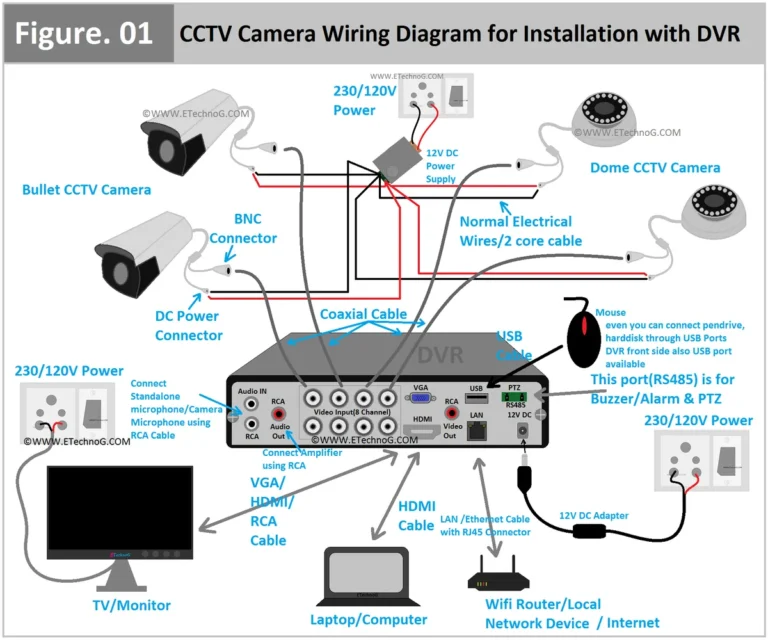
- Inspect the Physical Ports: Take a look at the back of your DVR. You'll see a series of connectors, often BNC ports, which are where traditional analog cameras plug in. Count these ports. For most standard DVRs, the number of BNC connectors directly corresponds to the maximum number of cameras it can support. So, if you see 16 BNC ports, it's very likely a 16-channel DVR.
- Consult the User Manual or Quick Start Guide: If you still have these, they are invaluable resources. They will clearly state the DVR's specifications, including its channel capacity, maximum resolution, and other important details.
- Check the Manufacturer's Website: Once you have the model number, a quick search on the manufacturer's official website will lead you to the product page. Here, you can find detailed specifications, datasheets, and even download the user manual if you've lost yours. This is the most authoritative source for your DVR's capabilities.
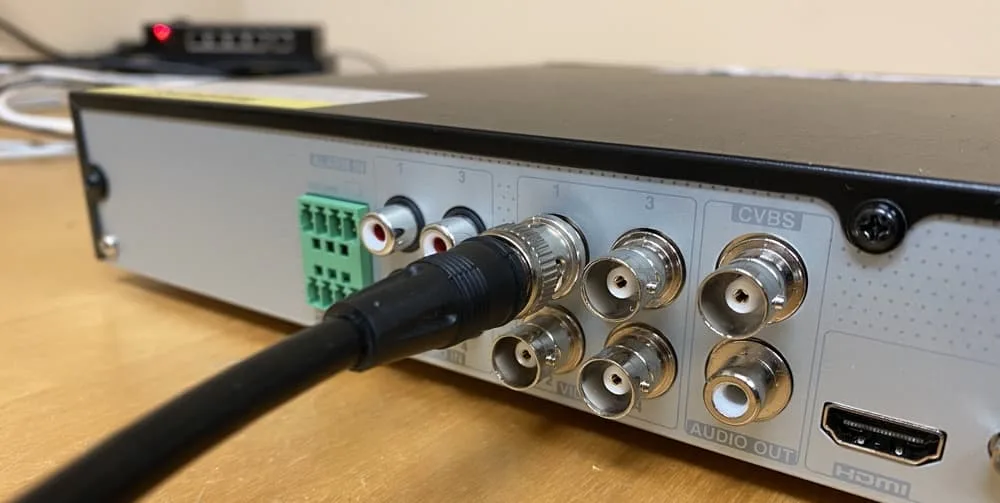
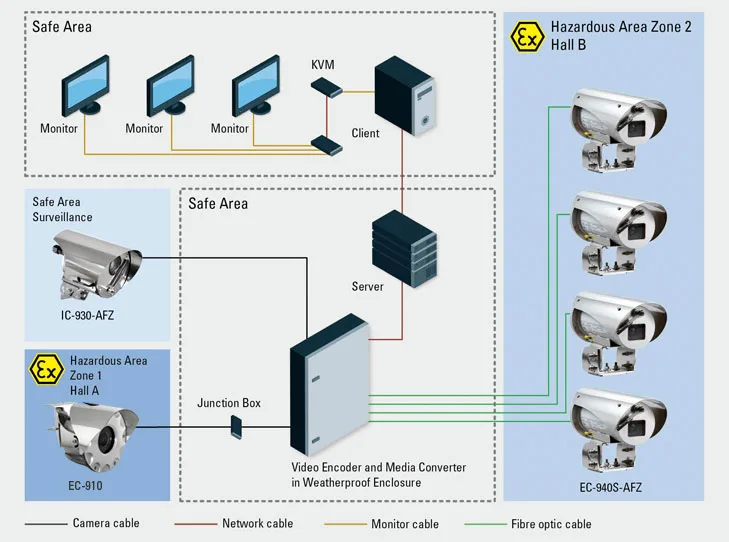
Image source: Bing (Web (fair-use with source credit))
Understanding these details ensures you don't overspend on cameras that your system can't accommodate. It’s a foundational step for any effective security setup.
Understanding DVR Channels: The Core of Camera Capacity
At the heart of how many cameras a CCTV DVR can support lies the concept of "channels." A channel on a DVR is essentially an input port specifically designed to receive and process video and audio signals from a single camera. Think of it like a lane on a highway; each lane can only handle so many cars at once.
DVRs are manufactured with a specific number of these channels, and this number dictates their maximum camera capacity. You'll commonly see DVRs marketed by their channel count:
- 4-Channel DVR: Designed to connect and record from up to 4 cameras.
- 8-Channel DVR: Supports a maximum of 8 cameras.
- 16-Channel DVR: Can handle up to 16 cameras.
- 32-Channel DVR: Designed for larger installations, supporting up to 32 cameras.
This channel count isn't just a marketing term; it’s a fundamental technical limitation. The DVR's internal hardware, including its processing power, bandwidth management capabilities, and storage interface, is engineered to handle the simultaneous data streams from that specific number of cameras. Manufacturer specifications, such as those found on official product pages, confirm that exceeding this limit isn't possible without specialized hardware or system upgrades.
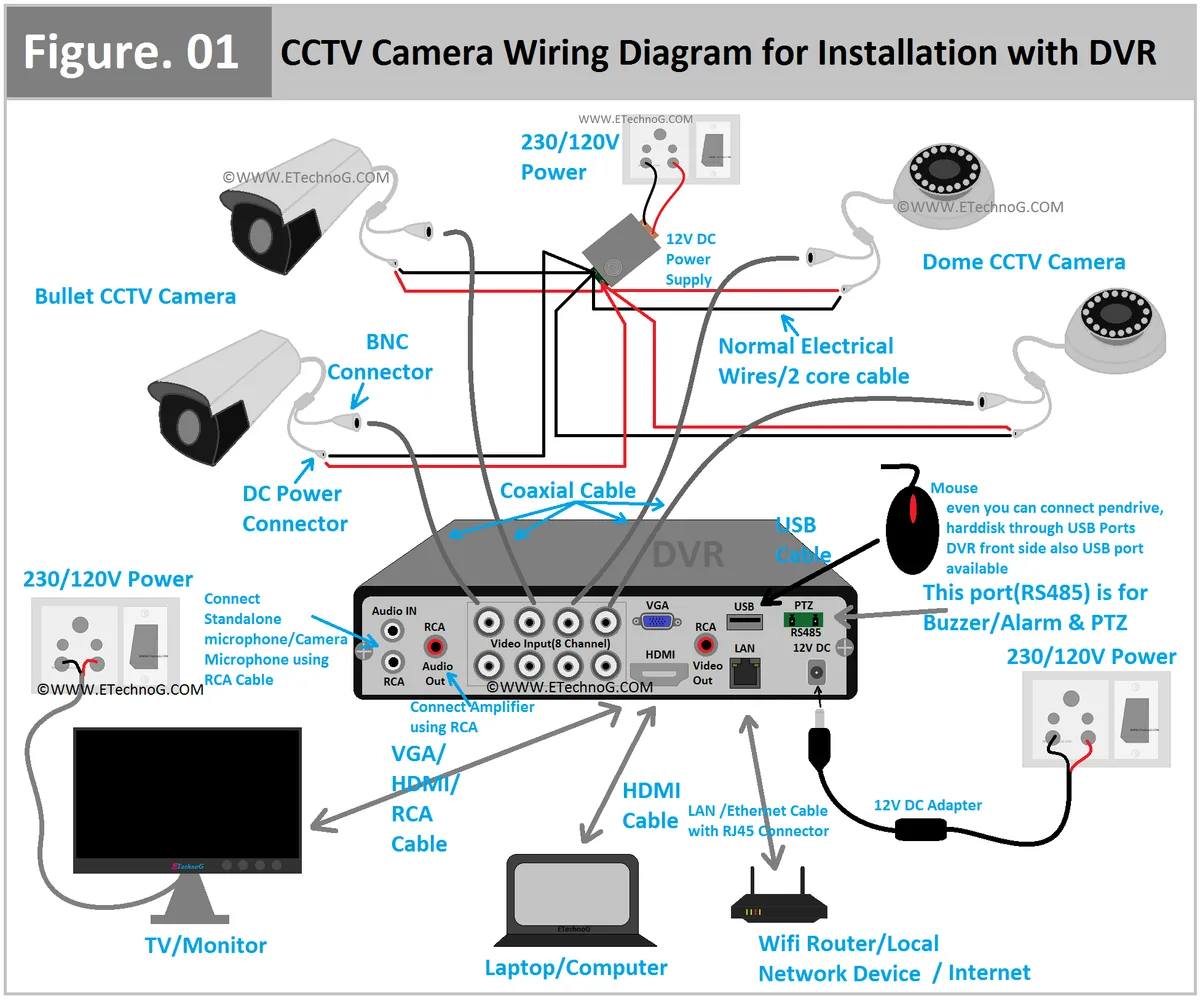
Image source: Web (Bing) / de.pinterest.com (Web image (fair-use with source credit))
The channel count directly influences the DVR's price and complexity, with higher channel counts generally indicating more robust hardware and a higher cost. When planning a surveillance system, selecting a DVR with sufficient channels for current and future needs is a critical decision for ensuring a scalable and effective security solution.
Identifying Your DVR's Channel Count: A Practical Guide
So, you've decided you need to know your DVR's camera limit. The good news is, you don't need to be a tech wizard to figure this out. The information is usually right there on the device itself or easily accessible.
Let's walk through the most common ways to identify your DVR's channel count.
Your first stop should be the physical DVR unit. Look for a sticker, typically on the bottom, back, or side of the unit. This sticker usually contains the model number and sometimes even the channel count directly.
For example, you might see "Model: DVR-8 Channel" or a model number that includes a number indicating the channels, like "XVR4104C-S3" where the "4" suggests a 4-channel device.
If the sticker isn't immediately clear, then it's time to count the physical inputs. For traditional CCTV systems using analog cameras, these are almost always BNC connectors. These are round connectors with a pin in the center.
Each BNC connector on the back of your DVR represents one camera input channel. So, count them up! If you see 8 BNC ports, you have an 8-channel DVR.
If you count 16, it’s a 16-channel unit. This physical count is one of the most straightforward indicators.
If you're still unsure, or if the ports aren't clearly labeled, the next best step is to consult the user manual or quick start guide that came with your DVR. If you’ve misplaced these physical documents, don't worry. Most manufacturers provide downloadable PDF versions of their manuals on their official websites.
Just search for your DVR's model number on the manufacturer's site, and you should be able to find all the technical specifications, including the exact channel capacity. This documentation is your most reliable source for accurate system information.
When You Need More Cameras Than Your DVR Has Channels
So, you've assessed your security needs, perhaps you've added a few more vantage points to cover, and you've realized your current CCTV DVR simply doesn't have enough channels to accommodate them all. This is a common situation, and it means you've hit the fundamental limit of your existing hardware. You can't just magic more camera inputs into a device that was manufactured with a fixed number.
When you're in this position, it's important to understand that a DVR's channel count is a hard limit set by its internal architecture. Manufacturer specifications, such as those detailed on official product pages, clearly define the maximum number of cameras each model can support. Trying to force more cameras onto a DVR will result in either the new cameras not being recognized, or the system becoming unstable, leading to issues like poor recording quality or video lag, as detailed in our guide on how to fix security camera video lag.
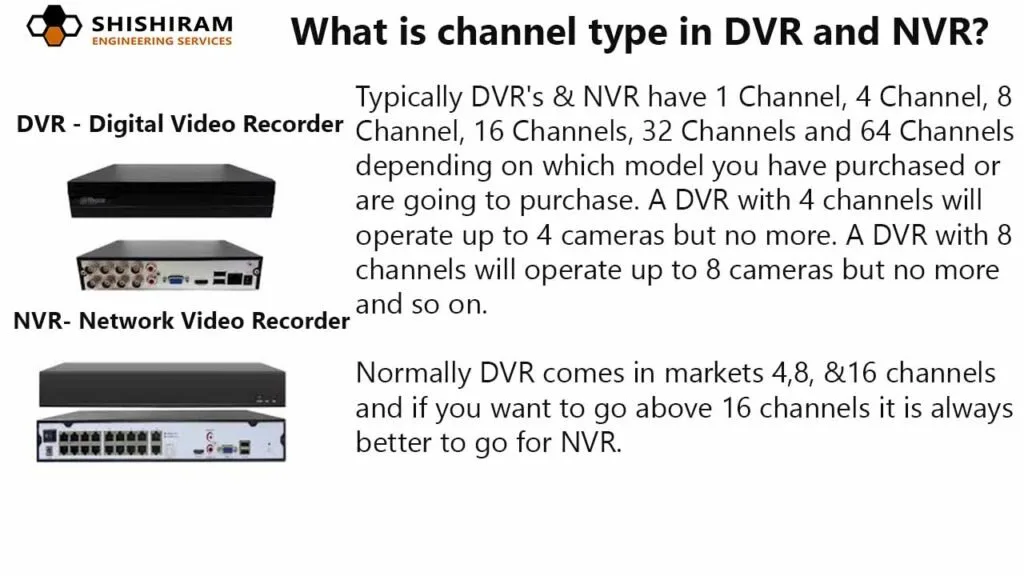
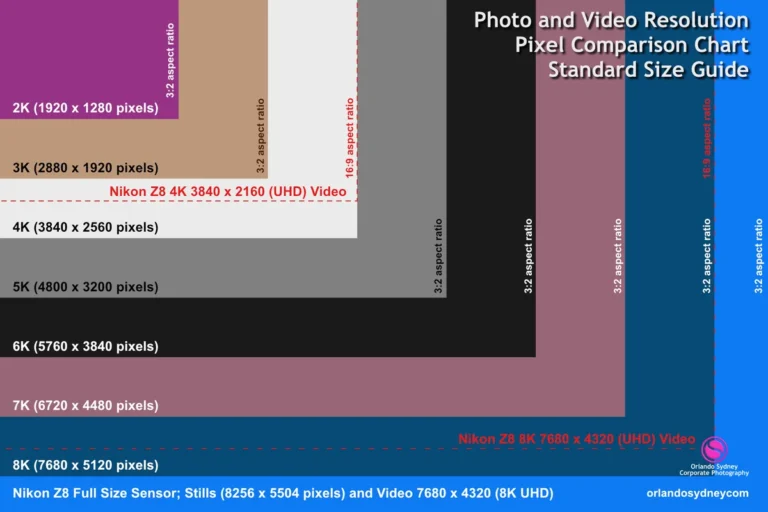
Image source: Web (Bing) / shishirameng.com (Web image (fair-use with source credit))
If you find yourself in this scenario, you have two primary paths forward:
- Upgrade Your DVR: This is the most direct solution. You would replace your current DVR with a new one that offers a higher channel count, such as upgrading from an 8-channel to a 16-channel or 32-channel model. This ensures all your cameras can be connected and recorded properly. You'll need to consider the cost of the new DVR and the effort involved in transferring existing footage or reconfiguring your system.
- Consider an NVR (Network Video Recorder): If your current cameras are IP (Internet Protocol) cameras, an NVR might be a more suitable and scalable solution. NVRs also have channel limits, but they are designed for network-based cameras and often offer more flexibility and higher camera capacities than traditional DVRs. This could be a good option if you're looking to transition to a more modern surveillance system or if your existing cameras are already IP-based.
Choosing between upgrading your DVR or switching to an NVR depends on your current camera type, your budget, and your long-term surveillance goals.
Mistakes to Avoid When Planning Your Camera Setup
When you're setting up a new CCTV system or expanding an existing one, it's easy to overlook crucial details that can lead to headaches down the road. A prime misstep is not accurately assessing your camera needs versus your DVR's capabilities. This often results in buying more cameras than your recorder can handle, rendering some of them useless.
Another frequent error is neglecting future needs. You might only need 4 cameras now, but what if you want to add 2 more next year? Buying a 4-channel DVR today means you’ll need a full system upgrade later if your needs grow.
It’s much more cost-effective to buy a DVR with slightly more channels than you currently need, like an 8-channel unit if you only need 4, to allow for expansion.
Ignoring the technical specifications beyond just the channel count is also a mistake. While channel count dictates how many cameras, other factors like resolution (e.g., 1080p, 4K), frame rate, and bandwidth requirements can affect performance. A DVR might support 16 cameras, but if they are all high-resolution 4K cameras, the DVR's processing power and network throughput might struggle, potentially leading to recording issues or why is my security camera showing a black screen symptoms.
Always check the DVR's supported resolutions and bandwidth per channel. Poor cable quality can also cause why is my security camera blurry or connection problems, regardless of the DVR's capacity.
A DVR with many channels recording high-resolution video will fill up storage much faster. You'll want to ensure you have enough hard drive space to store footage for the duration you require, whether that's a few days or several weeks. Understanding how long security footage should be kept is key to right-sizing your storage.
Finally, don't forget about firmware updates. Keeping your DVR's firmware up-to-date can resolve bugs, improve performance, and even add new features. Failing to do so can leave your system vulnerable or operating below its optimal potential, so knowing how to update security camera firmware is a good practice.
Thinking ahead during the initial planning stages will save you significant time, money, and frustration in the long run. Always refer to your specific DVR's documentation for the most accurate and detailed information regarding its capabilities and limitations.
Alternatives to Traditional DVRs
While CCTV DVRs have been a staple in surveillance for years, the technology has evolved, and there are now several compelling alternatives that offer different advantages. The most prominent is the Network Video Recorder (NVR). Unlike DVRs, which typically use analog cameras connected via BNC cables, NVRs are designed to work with IP (Internet Protocol) cameras.
These are network-connected cameras that transmit data over Ethernet cables or Wi-Fi.
NVRs often provide higher resolutions, more advanced features like built-in analytics, and greater flexibility in camera placement since they rely on network infrastructure rather than direct cabling to the recorder. For example, an NVR system can easily incorporate wireless IP cameras, simplifying installation in areas where running cables is difficult. Aggregate user reviews often highlight this flexibility for complex installations.
Manufacturer documentation for NVRs often highlights their scalability and ability to handle higher megapixel cameras compared to many traditional DVRs.
Another approach, especially for smaller or cloud-focused setups, is cloud-based surveillance. Instead of a physical DVR or NVR on-site, video footage is streamed directly to a cloud service. This eliminates the need for local storage hardware and offers remote access from anywhere with an internet connection.
Companies like Reolink or Arlo offer systems where cameras connect to Wi-Fi and upload recordings to their respective cloud platforms. This method is excellent for those who prioritize accessibility and don't want to manage hardware, though it often involves subscription fees for storage.
The choice between a DVR, NVR, or cloud solution depends on your existing infrastructure, camera type, desired features, and budget. If you have an established analog camera system, sticking with a DVR might be the most cost-effective upgrade path. If you're starting fresh or looking to leverage higher-resolution IP cameras, an NVR or a cloud-based system often presents a more modern and capable solution.
For those experiencing issues with their current setup, understanding why is my security camera delayed can help determine if a different recording solution is needed.
When making the switch, always ensure your network infrastructure is robust enough to handle the increased data traffic, especially with multiple high-resolution IP cameras. You can find tips on how to reduce security camera bandwidth to help manage this. This proactive approach to network management is crucial for the smooth operation of any modern surveillance system.
It ensures that your cameras can communicate effectively with the recorder without introducing latency or data loss. Ultimately, the "best" alternative is the one that aligns with your specific security needs and technical comfort level.
Frequently Asked Questions About DVR Camera Support
What is a "channel" on a DVR?
A channel on a CCTV DVR is an input port designed to receive and process video and audio signals from a single camera. The total number of channels dictates the maximum number of cameras the DVR can simultaneously connect to and record.
Can I connect more cameras than my DVR's channel count?
No, you cannot connect more cameras than your DVR has channels. Doing so will prevent the additional cameras from being recognized or will cause system instability and recording issues.
Do all DVRs support the same type of cameras?
Not necessarily. Traditional DVRs primarily support analog cameras via BNC connectors. However, many newer "hybrid" DVRs can also accommodate some IP cameras.
Always check your DVR's specifications for compatibility.
What happens if I plug too many cameras into my DVR?
If you plug more cameras into a DVR than its channel count allows, the system will likely not recognize the excess cameras. In some cases, it could lead to instability, dropped frames, or other performance issues for the cameras that are recognized.
How does camera resolution affect DVR capacity?
Higher resolution cameras (like 4K) transmit more data than lower resolution ones (like 720p). While the channel count sets the number of cameras, the DVR's processing power and bandwidth capacity determine if it can handle the quality of video from that many cameras simultaneously.